At Callstack, we maintain a growing set of agent skills. Things like agent-device, which gives agents a way to control mobile devices. Or agent-react-devtools, which lets them interact with React DevTools. Or Rozenite, which allows agents to interact with Rozenite plugins and inspect app state. Each skill ships as a SKILL.md file: plain markdown that tells the agent what it can do, when to do it, and how.
Maintaining them may sound simple. Rewrite a sentence here, reorder a section there, sharpen an example. But we kept running into the same quiet problem: we would make a small change, fire a prompt in the CLI, and it would look fine. Then someone would try the same skill on a different agent, and it would pick the wrong tool, skip a step, or go off on its own. The markdown looked fine, but behavior changed.
The frustrating part was that we had no way to tell when behaviour changed. There was no record of what the agent actually did, no way to compare runs, and no way to say with confidence that a change made things better or worse. It was just vibes and hope.
That is the problem Skillgym solves.
The questions a quick check will not answer
When you edit a SKILL.md, three questions matter:
- Did the agent load this skill, and not reach for something else?
- Did it follow the right steps: reading the right files, running commands in the expected order?
- Was the final result still correct, without silently taking twice the tokens to get there?
You can try to answer these by firing a prompt and reading the output. But that only tells you what happened once, on one agent, while you were watching. It doesn't give you anything to compare against next time. And it also definitely doesn't catch the regression that only shows up on Codex.
What Skillgym does
Skillgym runs an agent session against a real CLI (OpenCode, Codex, Claude Code, or Cursor Agent), collects what happened, and lets you write pass/fail assertions against the result. You describe what correct behavior looks like. Skillgym tells you whether it happened, and keeps the artifacts around when it did not.
No mocks. No simulated transcripts. The agent reads the skill the same way it would in production, in a real working directory, with real tool calls going out. If it breaks, it breaks the same way your users would see it break.
What you can check
When you inspect an agent run by hand, you are already asking the right questions. You scroll through the trace looking for the skill name, checking which files were opened, making sure commands ran in the right order. Assertions are those same checks written down, so you do not have to do them manually every time.
Did the agent use the right skill?
assert.skills.has(report, "agent-device");Did it read the right files?
assert.fileReads.includes(report, /bootstrap-install\.md$/);Did commands run in the right order?
assert.commands.before(
  report,
  /^agent-device\s+open\b/,
  /^agent-device\s+snapshot\b/
);
assert.commands.before(
  report,
  /^agent-device\s+snapshot\b/,
  /^agent-device\s+close\b/
);
Was the final output correct?
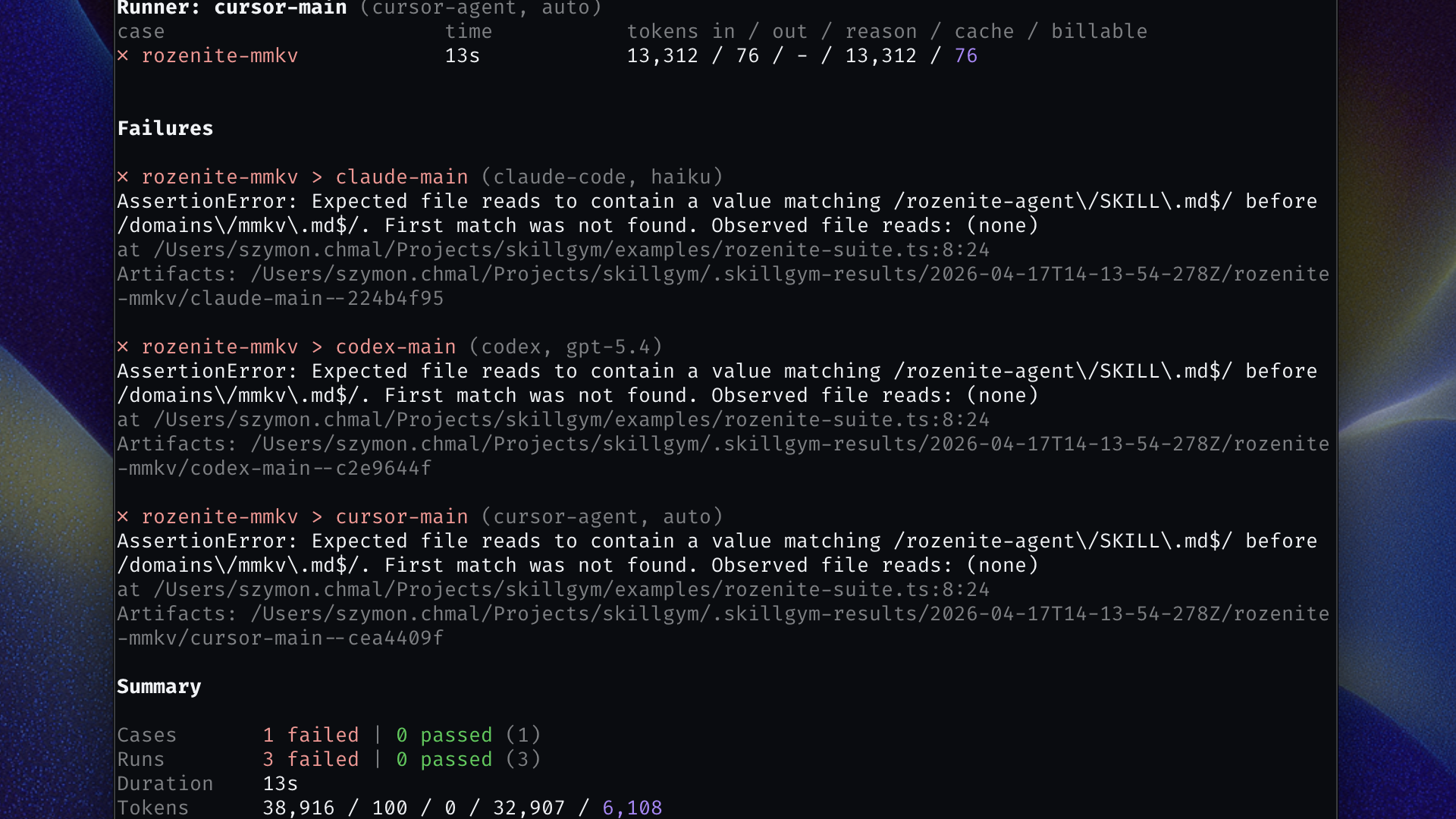
assert.match(ctx.finalOutput(), /Settings opened/i);Throw, and the run fails, with the exact assertion, the full session artifact, and a path to dig into. Return, and it passes. That's the whole contract.
You do not need to write all of these at once. A single assert.skills.has check is already more than a manual prompt. Start there and add more as you learn what your skill actually does.
And because assertions are just TypeScript functions, you are not limited to the built-in helpers. Skillgym passes you the full session data: every tool call, every file read, every command, the final output, token counts. If the built-in helpers do not cover what you need, you can write the check yourself.
One skill, every agent
Here is something we learned the hard way: a SKILL.md change that passes Claude Code can silently break in Codex. Behavior that works with one model's context window may not survive another. The agent that uses your skill in production might not be the one you tested with.
Skillgym runs the same suite across every configured runner (OpenCode, Codex, Claude Code, Cursor Agent) so you see the full picture before you trust the change. If one runner starts behaving differently after an edit, you will know which one, and you will have the session to show why.
Giving each run a clean slate
Some skills do not just read files. They create them, modify them, run install scripts, or depend on a specific directory structure being in place. If two runs share the same workspace, they can bleed into each other in ways that are hard to reproduce and even harder to debug.
Skillgym supports isolated workspaces: each case gets its own fresh directory before the agent starts. You can point it at a template directory to copy a full project tree into place, and run a bootstrap command before the agent touches anything. When a run fails, the workspace is kept as-is under the output directory so you can inspect exactly what the agent saw.
When a skill edit gets expensive
Some regressions do not break behavior; they inflate it. An innocent-looking restructure can make the agent loop through extra steps, re-read files it already has, or recover from confusion it should not have encountered. The result looks correct. The token bill is quietly twice what it was.
Skillgym can track token usage per case and per runner against a stored baseline. When a skill edit pushes usage past your tolerance, the run flags it. Set the baseline once, update it deliberately.
Getting started
Install as a dev dependency:
npm install -D skillgymAdd a skillgym.config.ts with at least one runner:
import type { SkillGymConfig } from "skillgym";

const config: SkillGymConfig = {
  runners: {
    "my-agent": {
      agent: {
        type: "claude-code",
        model: "claude-sonnet-4-6",
      },
    },
  },
};

export default config;
Write a first test:
// skillgym/my-suite.ts
import { assert, type TestCase } from "skillgym";

const suite: TestCase[] = [
  {
    id: "agent-device-settings-check",
    prompt: [
      "Use agent-device to open Settings,",
      'verify "Privacy" is visible with snapshot,',
      "then close the session.",
    ].join(" "),
    async assert(report) {
      assert.skills.has(report, "agent-device");
      assert.commands.before(
        report,
        /^agent-device\s+open\b/,
        /^agent-device\s+snapshot\b/
      );
      assert.commands.before(
        report,
        /^agent-device\s+snapshot\b/,
        /^agent-device\s+close\b/
      );
    },
  },
];

export default suite;
Run it:
npx skillgym run ./skillgym/my-suite.tsStart with one runner and one case. Widen the matrix once you trust the setup. It is also worth keeping individual cases focused on a single behavior rather than testing an entire workflow in one prompt. Smaller cases are cheaper to re-run, easier to debug when they fail, and give you a clearer signal about what actually changed.
Final Words
Skills are how we extend what agents can do. We write them, we refine them, and we ship them to users who depend on them working correctly. But until now, there was no straightforward way to verify that a skill still behaves the way you intended after every edit. You just had to run it and hope for the best.
Skillgym is our answer to that. It is open source, under active development, and we would love to hear how it holds up against the skills you maintain.
As always, if you encounter an issue or have an idea for new functionality, don't hesitate to let us know via issues in the GitHub repository. Happy hacking!


Learn more about AI
Here's everything we published recently on this topic.