Last week, we ran a complex, multi-step, AI-driven debugging session on a production app. The session took 9 minutes and consumed roughly 150,000 tokens on Opus 4.6. Given the complexity (navigating the app, debugging network requests, and profiling performance) that cost seemed justified. Right?
Not really.
Today, that exact same session took 6 minutes and 69,200 tokens. That’s less than half the token cost and a 33% reduction in time.
Here is a look at the problem of token efficiency in LLM-driven mobile automation and how we cut our token usage in half.
Why we talk about token efficiency
Every screenshot, UI dump, or log line an AI agent sees becomes tokens in its context window. More interactions mean more context used, which is fine when it moves the agent closer to solving the task. It becomes a real challenge when the agent performs unnecessary actions that waste our precious context window.
That matters for two simple reasons:
More tokens mean higher cost. Rich inputs like screenshots are expensive. Text-based accessibility snapshots are often much cheaper while still giving the agent what it needs.
More tokens also mean less usable context. The context window is limited. If an agent fills it with bulky observations, important details get pushed out or summarized away. As context gets crowded, the model is also more likely to miss what matters.
A useful way to picture it: tokens are the agent's working memory budget. Waste that budget on heavy, repetitive inputs, and the agent gets slower, more expensive, and less reliable. Using the smallest amount of context helps the model to stay accurate, fast, and cost-effective.
What is Agent Device
agent-device is a command-line tool designed to give AI agents direct, reliable control over iOS and Android apps. It’s the “eyes” and “hands” for a LLM to better understand the app it works with.
Thanks to the simple to use and reason with CLI interface, it allows agents to navigate apps, run automated testing workflows, debug native logs, and capture visual proof directly from simulators and physical devices. Similar to how a human device operator would.
How we made our AI Agent cut token usage in half
Let’s start with the task we gave to the model. The full path looks like this:
open Expensify → navigate to Inbox → open chat → file expense with camera → debug slow API call → profile top render offenders → send message.
In our latest test where we’ve seen improvements, it resulted in 55 tool calls, 25k tokens used on tool calls + skills, and 44k on reasoning. Only one fallback interaction (screenshot), which means we gave the agent good-enough tools and instructions, at least most of the time.
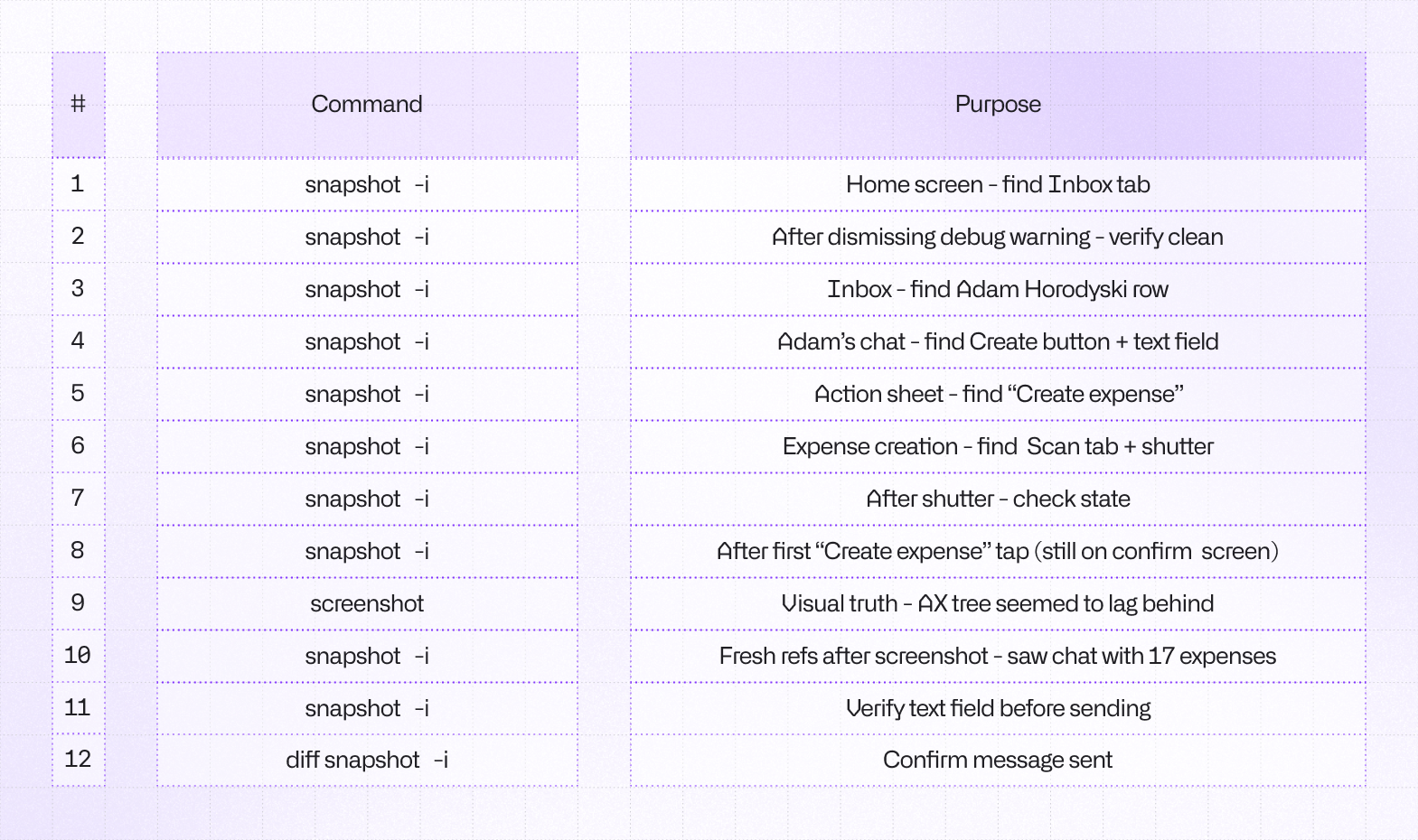
Translating a mobile interface into something an LLM can understand natively is a massive challenge. Since the very beginning, agent-device relies on a snapshot approach (what you see as snapshot -i command below) which in general should be more token-efficient when compared to e.g. screenshots. The reality turned out to be more complex than simple examples and theory. We had to rethink a few concepts.
Leveraging the accessibility
Agent Device uses accessibility tree snapshots to orient itself within the app. It’s the same technique a screen reader, such as VoiceOver uses to make people with visual impairments able to use our apps. To visualize the accessibility tree in a more agent-friendly way, we convert it to text representation and assign refs, such as @e5, which are pointers to particular elements in the tree that the agent can interact with or simply read.
Snapshot: 180 nodes
@e1 [window]
  @e2 [scroll-view] "Inbox" [scrollable]
    @e3 [button] "Message 1"
    @e5 [button] "Message 2"
    @e6 [button] "Message 3"
    @e7 [button] "Message 4"
    ...
This approach has two interesting benefits over screenshots: it uses fewer tokens in general and it gives agents actionable references to work with. Screenshots are still great as a fallback solution, but on average they burn 3-4x more tokens than interactive snapshots and require the model to guess the element and find its coordinates on its own. Even high-end models sometimes get confused with this task.
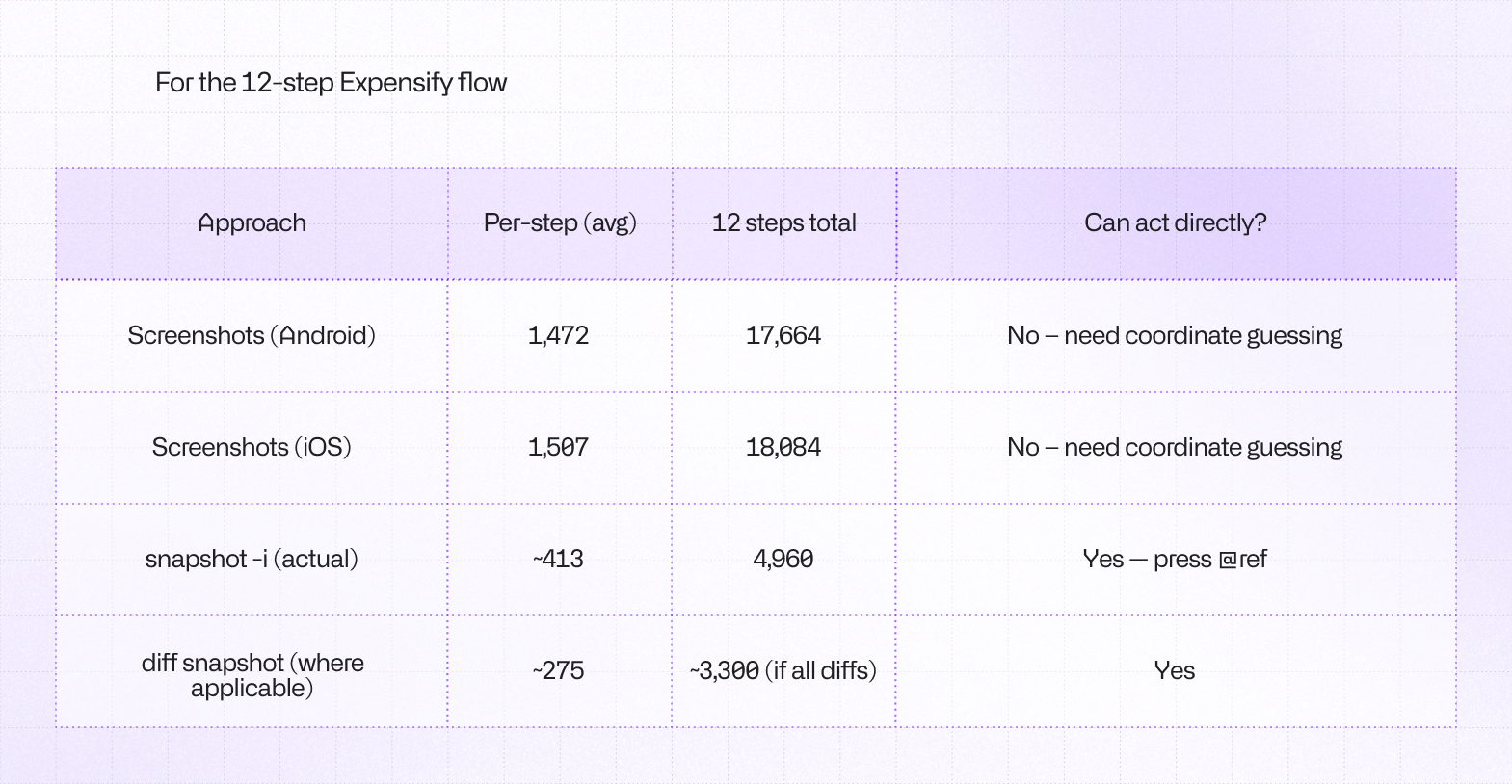
12 screen reads using UI snapshots cost us only 5k tokens total. That is the equivalent token cost of 3 raw screenshots for this specific device. This alone yielded a 3.5x efficiency gain in screen reading.
Trimming snapshots
Mobile UI hierarchies can be massive, often containing hundreds of off-screen elements, hidden views, and deeply nested wrappers. We implemented aggressive trimming for our UI snapshots, cutting off-screen elements entirely. By only feeding the model the UI state that is currently actionable, we drastically reduced the noise-to-signal ratio in the prompt.
Snapshot: 10 visible nodes (50 total)
@e1 [window]
  @e2 [scroll-view] "Inbox" [scrollable]
    [content above scroll-view hidden]
    @e3 [button] "Message 1"
    @e5 [button] "Message 2"
    @e6 [button] "Message 3"
    @e7 [button] "Message 4"
    [content below scroll-view hidden]
    ...
In longer lists, this approach can reduce token usage by up to 80%. What’s even more important, this approach reduces the error-rate for an agent trying to access an element that’s not possible to reach with press or fill because they’re not in view, which saves both tokens and time as agent doesn’t need to re-snapshot the tree after failure or scrolling down.
Improving Agent Skills
Compared to the previous version of agent-device, we made the built-in skills much more explicit about how agents should explore apps efficiently. The biggest shift was toward a more token-efficient workflow: use visible-first snapshots, prefer diff snapshot after changes, discover the exact app/package before acting, and use targeted log queries instead of dumping large outputs into context.
We also tightened the guidance around common failure modes. The skills now call out stale refs, React Native warning/error overlays (a big offender in our test case), off-screen elements, and when to switch from normal exploration into debugging. The result is less guesswork, fewer wasted steps, and more reliable agent behavior.
Fixing Android-Specific quirks
Android got a set of reliability fixes aimed at the biggest sources of agent confusion. Snapshots are now more visible-first, off-screen items are summarized instead of exposed as misleading tappable refs, and the tooling is better at recovering when the Android accessibility tree lags behind what is actually visible on screen after navigation or submits. A common reason for agent to fall back to screenshots.
We also improved Android diagnostics. Since the last version, we added Android CPU and memory sampling, improved network dump recovery from logcat, and fixed app/package handling for open and relaunch flows. Together, those changes made Android sessions less brittle and much easier to debug.
What’s next?
While dropping token usage by over 50% is a massive win, there is still room for improvement. We’ve confirmed that structured snapshots behave significantly better than screenshots, but we can push this further:
- Skill Optimization: We estimate we can shave another 3k - 4k tokens by further refining tool schemas.
- Diff Snapshots: We plan to implement
diff snapshotlogic (only sending the UI changes between steps rather than the whole tree). It won't be a silver bullet, but it will yield marginal gains. - Log Analysis Efficiency: Streamlining how we pass network and perf logs to the model has a potential drop of 2k - 4k tokens.
By continually refining the interface between the LLM and the device, we are making autonomous mobile testing and debugging faster, cheaper, and increasingly reliable.
Try it out
Check out Agent Device in action on GitHub and give it a star! You can set it up on your CI/CD pipeline using our templates, or get in touch if you need any help with the setup!



Learn more about Testing
Here's everything we published recently on this topic.