React Native on Meta Quest: What We Learned About Building for VR
React Native on Meta Quest: What We Learned About Building for VR
See Meta Quest used as a practical dev setup and watch the team build and test React Native features directly inside a VR workspace.
React Native on Meta Quest: What We Learned About Building for VR




This session is focused on Meta Quest as a VR device and what makes it a compelling environment for developers. It is an Android-powered system wrapped in an immersive interface, which makes the path from traditional mobile development to VR less daunting than expected.
Jan is our guest for this episode, as he is the most experienced with the platform. He led the demonstration, bringing three months of hands-on experience building with the device and sharing what he learned while writing about the platform.
Meta Quest VR experience in general
On Meta Quest, every screen can be resized, repositioned, or centered to focus on the task at hand. The interaction feels physical: you point at a corner, grab the handle, and stretch the window to the scale you want. Even though the viewers saw a slightly distorted perspective through the stream feed, Jan confirmed that inside the headset the curved UI reads naturally. Input flexibility is a highlight. Developers can switch between hand tracking, controllers, a mouse, or a keyboard.
Developer experience: using Meta Quest as a development platform
The practical demonstration showed how quickly Meta Quest can become a working development setup. Casting a MacBook screen into VR creates a set of virtual desktops where the editor, terminal, and browser run as usual. The responsiveness is surprisingly good: fluid enough that Jan used it for his daily work.
From there, the workflow mirrors standard React Native development. Expo Go can be installed directly from the Meta store, and a new project behaves like any other mobile app. After running the project from the Mac’s terminal, the app appears inside Quest as another VR window. It can be resized, pushed aside, or centered while remaining interactive through hand tracking, a mouse, or controllers.
The team emphasized that the platform-specific details covered in the stream are also documented in their articles, so developers can follow the same setup independently.
Advanced use case: live-coding the camera app
For the second half of the stream, the team built a small camera demo to see how far a common mobile pattern can be taken inside VR. They initialized an Expo app, added react-native-vision-camera, and wired it to the device’s available camera feed.
The surprise came when Jan switched to the front-facing camera. Instead of showing his real face, the feed surfaced his Shrek avatar, thanks to Quest’s virtual camera pipeline.
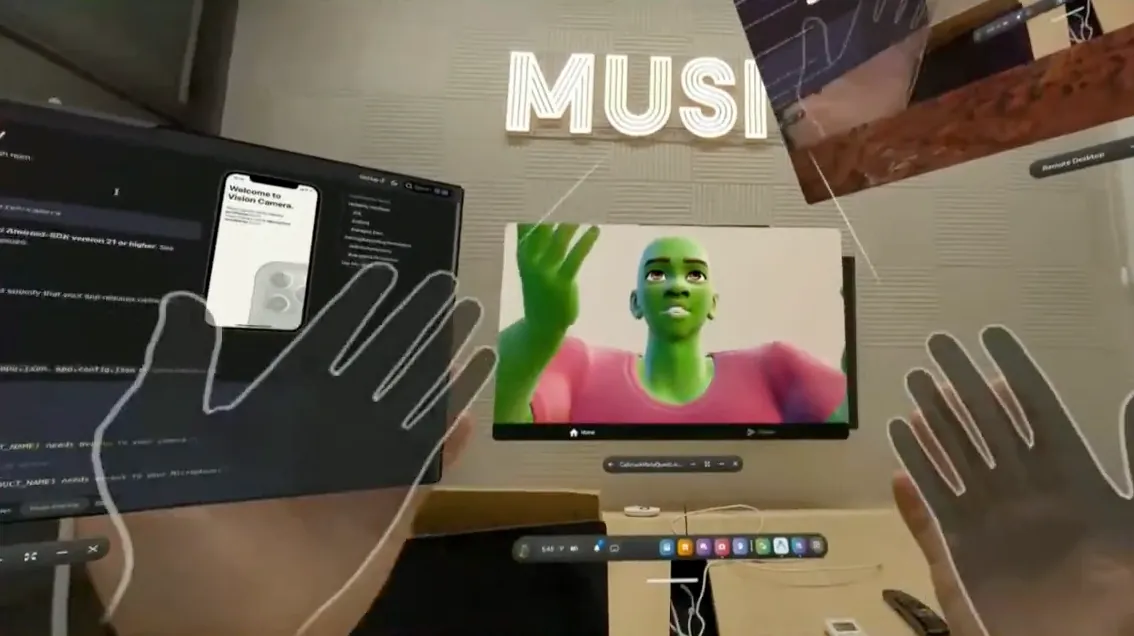
The unexpected result elevated the demo from a technical exercise to a moment of discovery about how VR layers real input, passthrough features, and avatar systems. It also illustrated how familiar React Native tools adapt in surprising ways once they run inside a headset environment.
Wrap-up
The stream closed with reflections on how approachable VR development becomes when the environment feels familiar. Meta Quest’s Android base, flexible input system, and integration with Expo and React Native bring down the barrier to entry. The team highlighted that you can experiment with standard mobile patterns (navigation, gestures, camera access) and see them respond inside a three-dimensional workspace. For developers curious about VR but unsure where to start, the message was clear: the tools you use today already take you most of the way there.
Watch the full recording to see each demo step in action and explore additional guides on bringing React Native apps to Meta Quest.
React Native on Meta Quest: What We Learned About Building for VR
See Meta Quest used as a practical dev setup and watch the team build and test React Native features directly inside a VR workspace.

Learn more about Virtual Reality
Here's everything we published recently on this topic.

















React Native Performance Optimization
Improve React Native apps speed and efficiency through targeted performance enhancements.
C++ Library Integration for React Native
Wrap existing C-compatible libraries for React Native with type-safe JavaScript APIs.
Shared Native Core for Cross-Platform Apps
Implement business logic once in C++ or Rust and run it across mobile, web, desktop, and TV.
Custom High-Performance Renderers
Build custom-rendered screens with WebGPU, Skia, or Filament for 60fps, 3D, and pixel-perfect UX.