I type a task on a keyboard small enough for two-thumb typing: check disk space.
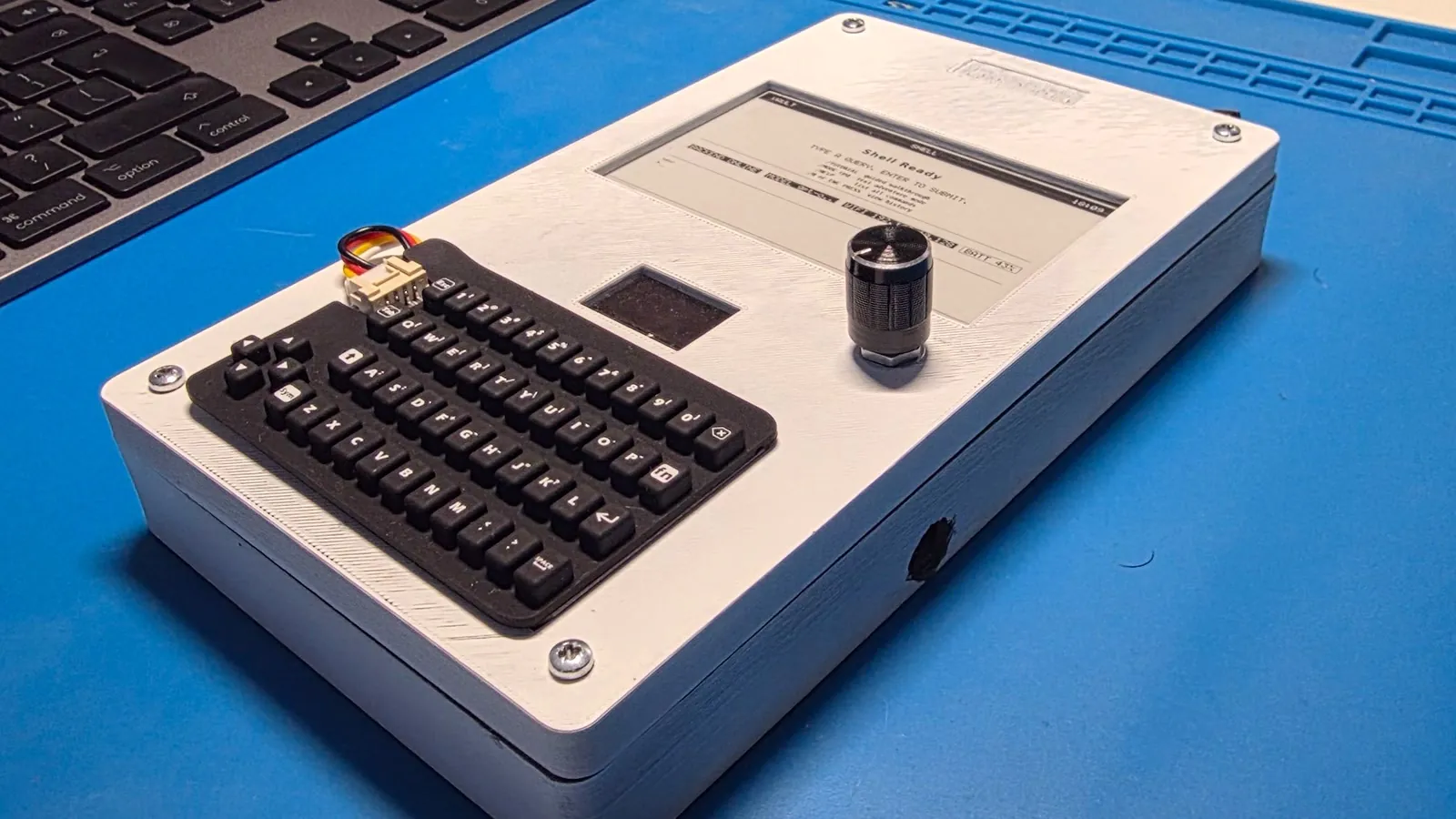
The characters appear on a 128×64 OLED. I press Enter. A worker starts, the 4.26-inch e-paper panel makes one slow full refresh to a static Thinking... card, and then the OLED begins showing a running OC THINK timer. On another computer on my network, an OpenClaw agent runs the command and turns its output into a short report. The timer advances while I wait. When the result is ready, the e-paper flashes again and replaces the card with the answer. Longer answers can be paged with a rotary knob. If I cut the panel’s power, the last page stays visible.
That sequence is the point of Vault, which is a handheld terminal with a keyboard, a rotary encoder, two displays, an ESP32-S3, and one 18650 cell. It is a shell, an LLM client, a front end for a self-hosted agent, and a text RPG. It is not a tiny Linux computer, and it does not run gpt-oss-120b on a microcontroller. The model and agent run on a host on my LAN; the handheld is the deliberately constrained instrument in front of them.
I built it because many mainstream AI interfaces had converged on the same object: a chat bubble inside a glowing, general-purpose screen. I wanted to find out what would happen if the interface were designed around reading rather than streaming, and around a task rather than an app.
The answer was to build Vault around two display rhythms, where the OLED tracks live activity, while the e-paper display holds the result.
Three constraints before choosing the hardware
I began with three rules:
- Text is the interface. No touchscreen, app grid, or bitmap chrome is required to submit a task and understand the result.
- Live state and durable content are two different jobs. They should not be forced onto the same display.
- Inference stays off the handheld. The device should remain responsive and bounded while models, agents, and backends remain replaceable.
Those constraints led to this stack:
It took 67 days and 131 commits to get from the first working displays to the release snapshot. The public release is a curated, squashed snapshot.
The interface has two clocks
Vault’s two displays serve different parts of the interaction, and their refresh speeds shape how each one is used.
The OLED is the fast surface. It redraws on input and state changes. It shows the current mode, the input buffer, connectivity, a running timer while the host is working, and a prompt such as READ 1/3 ENC>NEXT when a reply spans several pages.
The e-paper panel is the slow surface. A full refresh takes roughly three to four seconds in this build. A partial update takes about 600 milliseconds, at the cost of gradually accumulating ghosting. That makes the panel bad at cursors and animation, but excellent for coarse phase changes and completed thoughts.
In short, the two displays divide the work this way: interaction-rate events go to the OLED; phase changes and results go to e-paper.
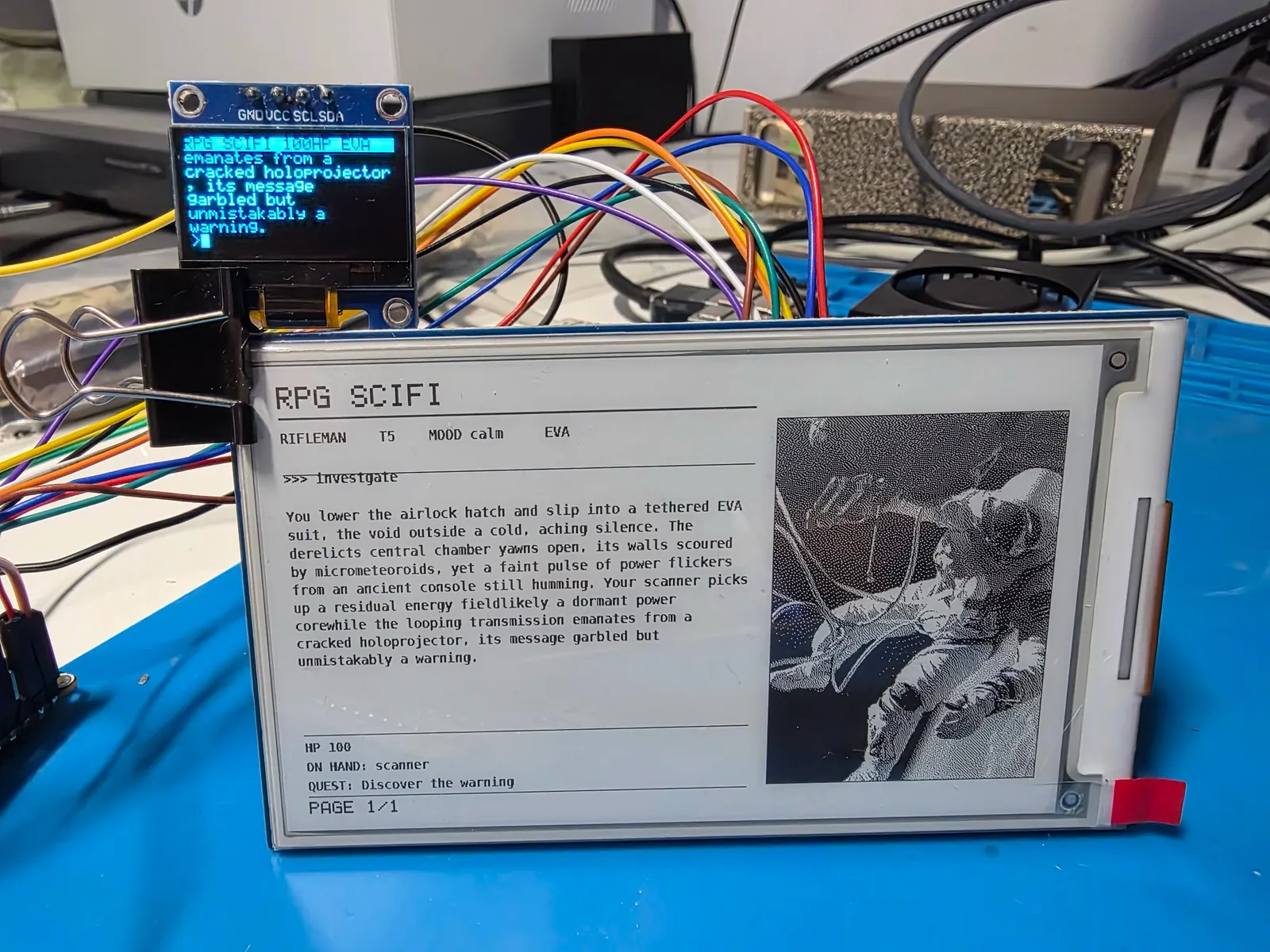
For assist and control requests, release candidate 8 (RC8), the firmware version used for this prototype, performs a full e-paper refresh for the static Thinking... state and another for the first result page. Consecutive RPG turns may use a partial result refresh. Between those slow transitions, the OLED carries the moving timer. Page turns use partial refreshes, and the driver forces a full refresh after six partial updates to clear accumulated ghosting. To avoid unnecessary flashes, the firmware computes a lightweight 32-bit fingerprint of each e-paper image. If it matches the previously displayed image, the transfer and refresh are skipped.
The firmware owns the reading layout. It word-wraps ordinary output at 92 characters, budgets 19 lines per page, and walks the text without dynamic allocation. The rotary encoder changes the page; on a multi-page reply, pressing it exits reading mode. RPG screens use a narrower text column because a dithered scene occupies the other side of the panel.
The e-paper UI is more than a terminal dump. A small design system defines five text styles, 4-pixel spacing tokens, shared rules, status blocks and footers, and a stable 50% dither. Consistency matters on a surface where every refresh is visible.
The e-paper panel’s slow refresh behavior explains one choice that would look strange in a browser: Vault does not stream model tokens onto the e-paper. Streaming is useful when a display can redraw cheaply. Refreshing this panel for each token or tool event would cause constant flashing, ghosting, and needless updates. The current prototype still flashes twice, once for the phase card and once for the result, but never for each token or tool event. If I optimized purely for latency, I would leave the previous e-paper page untouched while pending. I kept the static card because it makes the coarse phase legible at a distance.
That distinction travels beyond hardware. Many AI products mix two channels in one feed:
- operational state: listening, searching, calling a tool, retrying;
- artifact: the answer, plan, patch, or report the user came for.
Vault separates the operational state from the artifact the user came for. The status channel can update as the task runs; the completed answer, plan, patch, or report remains stable for reading and review.
Keep the model off the metal
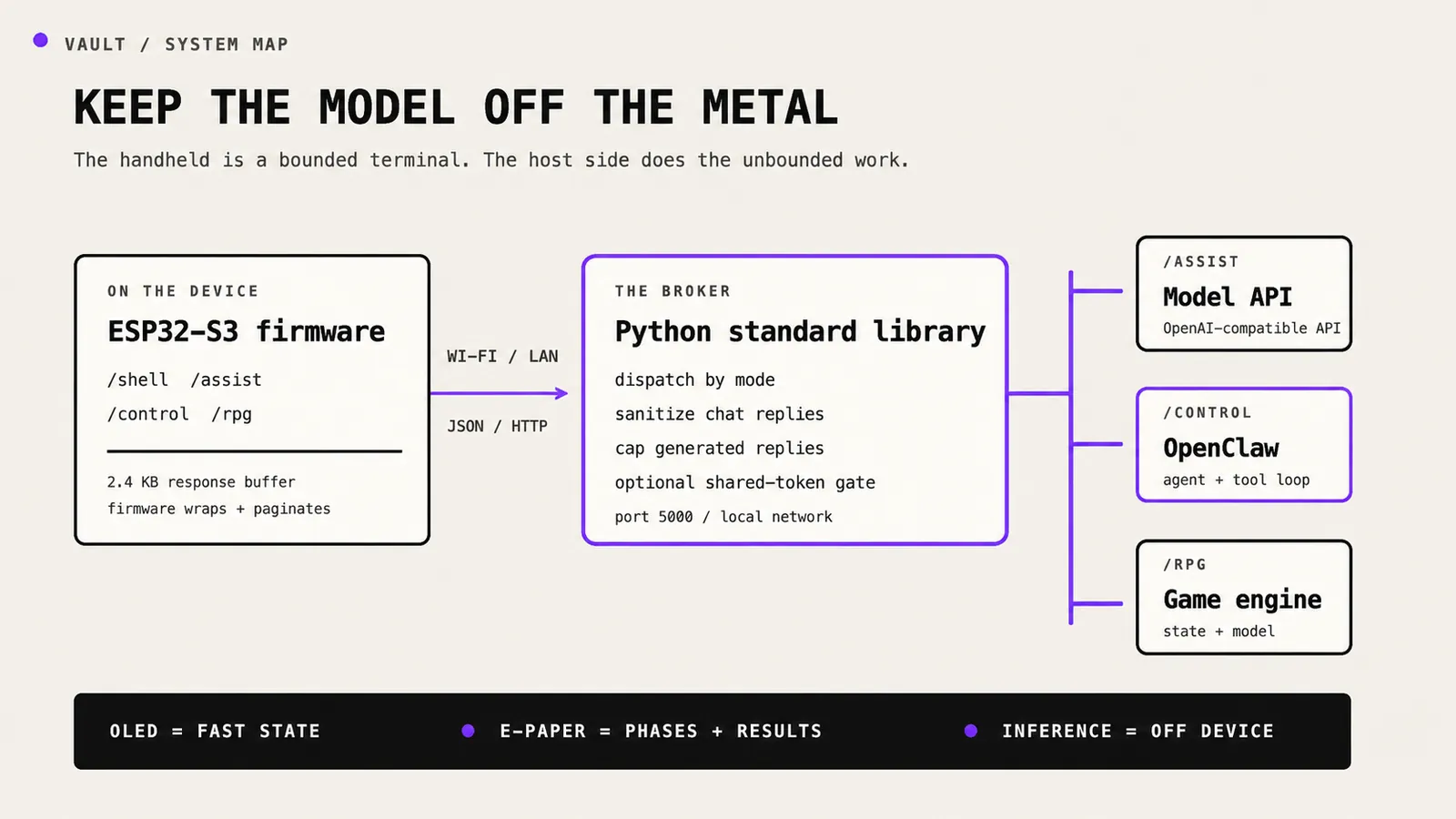
The ESP32 never speaks a model provider’s protocol directly. It sends compact JSON over HTTP to a small Python server on the LAN. The server uses only the standard library and has three relevant dispatch paths:
/chatsends a conversation to an OpenAI-compatible model endpoint;/clawnormally invokes one OpenClaw agent turn and returns its final reply; an empty successful reply is retried once;/rpg/*combines deterministic session state with model-generated narration.
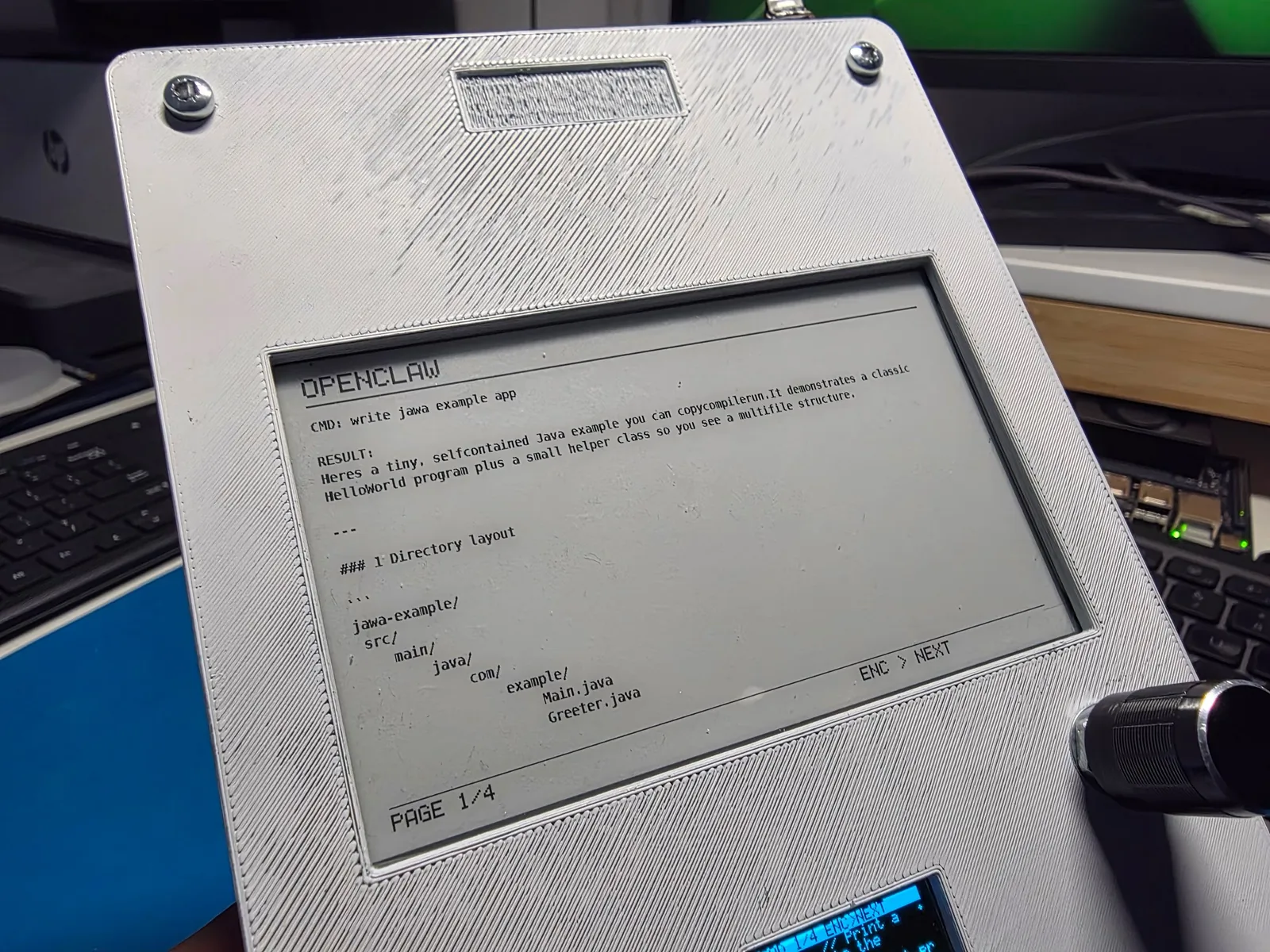
Generated chat, agent, and RPG-turn replies are capped at 1,500–2,000 characters. The /chat path removes basic Markdown. OpenClaw and RPG responses reach Vault largely unchanged, including the Markdown headings and code fences visible below:
HTTPClient first receives a dynamic response string; the parsed reply is then copied into a 2.4 KB static firmware buffer for wrapping and pagination. Model, agent, and RPG requests run on a FreeRTOS worker, although e-paper refreshes and synchronous health checks can still pause the main loop.
For the conference demo, I used gpt-oss-120b on an NVIDIA DGX Spark and served it locally with NVIDIA TensorRT-LLM. A LiteLLM proxy adapted the endpoint where the client and inference server expected different OpenAI-style request shapes. The same broker can target other OpenAI-compatible servers and hosted API, but for this demo, model inference remained on my LAN.
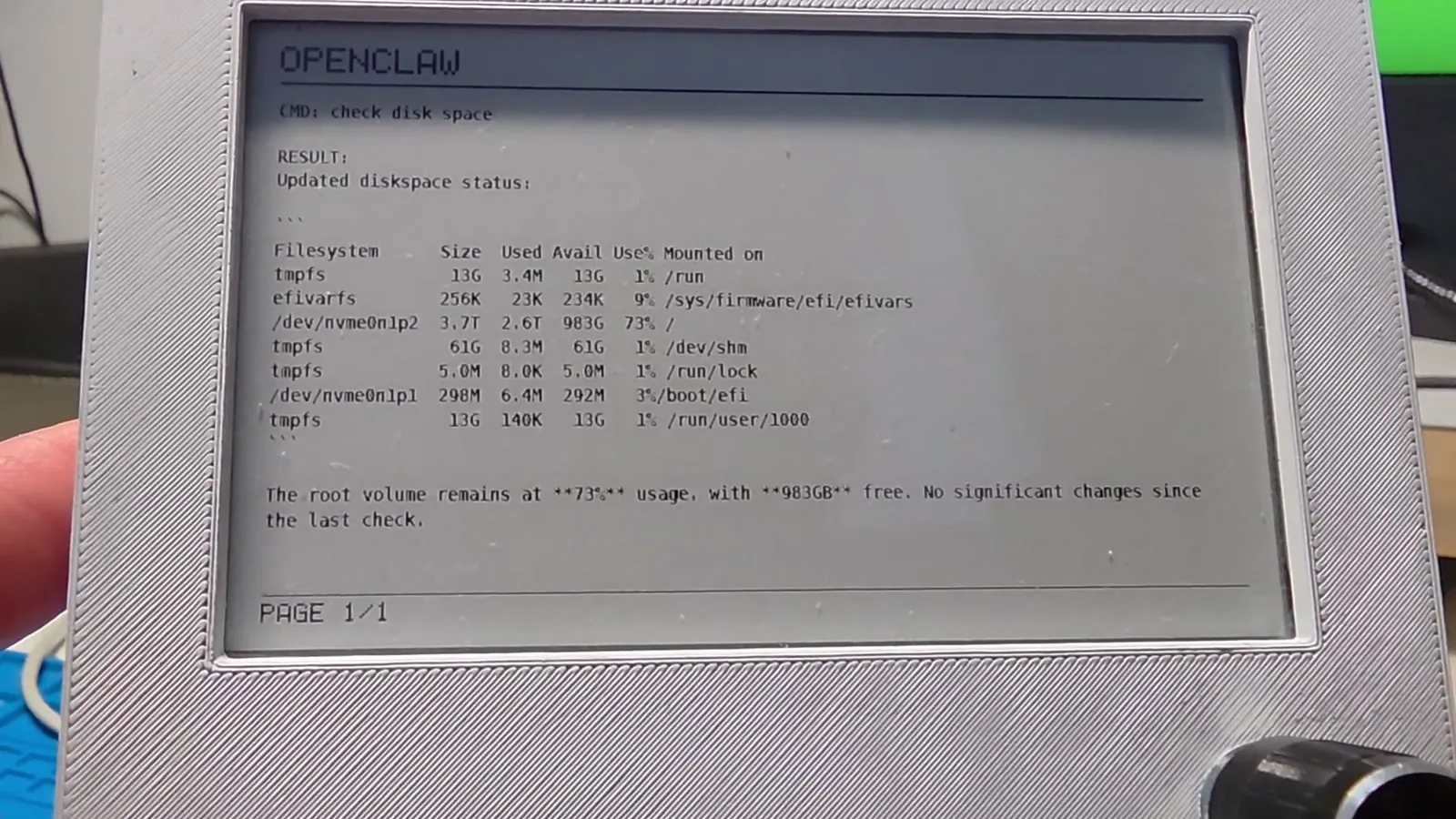
In this case, “local” means inference hosted on the LAN, not on the handheld device. The microcontroller gets bounded final reply buffers, simple firmware, and a mostly responsive UI. The host gets to change models, runtimes, or agents without reflashing the device.
In control mode, the backend currently waits for the OpenClaw turn to finish and returns the final payload. The agent may plan and call tools on the host, but Vault does not yet stream each tool event to the panel. While the request runs, the OLED shows the timer. When the agent returns its final reply, Vault displays it on e-paper. A future job-ID transport could expose progress and cancellation without holding one HTTP request open.
Here's the 29-second device demo, which shows Vault submitting an OpenClaw task, waiting on the live OLED, and settling the result onto e-paper:
Four modes, one piece of hardware
The shell remains the center of the firmware. A slash command changes how free text is routed:
An InputManager merges the CardKB, encoder, and USB serial into one event stream. Higher layers do not need to know whether a line came from the physical keyboard or the serial console. That abstraction became more valuable than I expected because it kept the rest of the firmware independent of physical input quirks, including disconnected peripherals, duplicate encoder signals, and delayed startup.
The failures were mostly electrical and silent
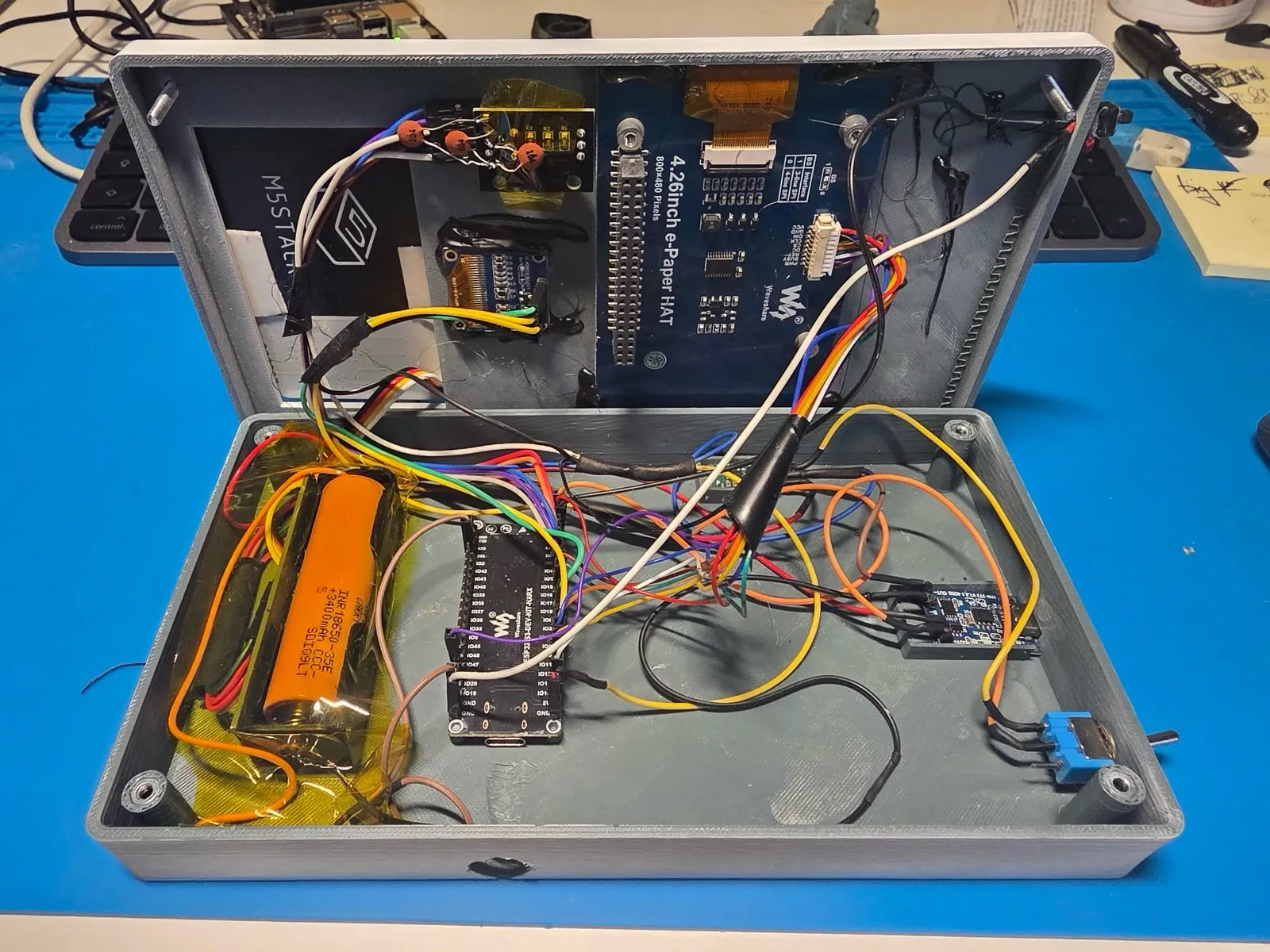
The architecture settled quickly. The physical system spent much longer teaching me not to trust a schematic that had not met a bench.
The I²C workaround violates the protocol
The development board had no external I²C pull-ups, and the hardware Wire path would not reliably ACK the OLED or keyboard. For this point-to-point prototype, I wrote two software buses. SCL and SDA are actively driven high and low, with SDA released while sampling ACKs and incoming data. The OLED bus uses a 3 μs half-bit delay; the slower CardKB gets 10 μs.
That made this build reliable with no added resistors, but it is not general I²C advice. Push-pull signaling violates I²C’s open-drain electrical model and is inappropriate for a shared or multi-master bus, or any peripheral that might hold a line low. The production-minded fix is proper pull-ups and a conventional bus. The software implementation was a pragmatic way to isolate the actual fault on short, single-master connections.
A “3.3 V” boost rail killed two OLEDs
I initially powered the displays from a Pololu U3V16F3 step-up regulator set to 3.3 V. A charged single-cell battery can sit above that target, and this regulator passes the higher input through. The OLED, therefore, received a supply voltage of roughly 3.8 V, above the SSD1306 controller’s recommended maximum VDD range of 3.3 V for normal operation. Two modules failed under that sustained overvoltage. Replacing the supply with a buck-boost stage fixed the rail across the cell’s discharge curve.
A working SPI initialization produced a blank panel
The e-paper driver initialized, the BUSY line behaved, and nothing appeared. In this board configuration, GPIO 13, an SPI2 IO_MUX MISO pin, behaved as though that function still owned it even when I initialized SPI with MISO = -1. I had assigned the pin to the display’s data/command line. Moving the line to GPIO 17 fixed the panel immediately.
I treat that as an observed board-and-core interaction, not a universal law about every ESP32-S3 design. The lesson is, when a peripheral fails after apparently successful initialization, check whether pin-matrix ownership is still affecting the assigned pin.
sizeof the wrong buffer rebooted every remote command
One remote-command path allocated char resp[256] and passed it to a polling function with sizeof(_respScratch), where _respScratch was a 2,400-byte member. The callee trusted the length and wrote beyond the stack buffer. Every non-local shell command could reset the device.
The fix was one line, reuse the large member, but the failure was expensive because it sat behind otherwise valid types and APIs. Hardware debugging and agent debugging share an unpleasant property: observability often drops where the system crosses a boundary. The lasting fixes were the ones that made those boundaries explicit and failures visible.
The RPG taught me what “LLM-native” should mean
The RPG began as a testbed for Vault’s longest workflows: long text, paging, saves, and 1-bit art. It became the clearest example of where the model should (and should not) own the system.
Python owns a persistent game state and rules. The LLM generates narrative and compact structured suggestions about the world and player; the engine parses, validates, constrains, and decides what becomes durable. The model can surprise without becoming a probabilistic database or the only source of truth.
That division of responsibility applies beyond the RPG: use the model for model-shaped work, then put deterministic software around the result. Let it write, characterize, connect, and vary the experience. Keep state, rules, and validation in code.
Separate channels created useful fallbacks
Serial input and separate display paths provide basic fallbacks. If the e-paper display fails, replies remain available through OLED scrollback and USB serial. If the OLED or CardKB fails, I can still use USB serial. Offline, local diagnostics still work.
The encoder remains the only way to turn e-paper pages, so losing it degrades the reading view. These paths are not formal fault tolerance, but they let me debug the prototype while one component is unavailable.
The LAN is not a security boundary
The prototype broker binds to all host interfaces (0.0.0.0), speaks plain HTTP, and exposes a remote-command route backed by a shell. Without VAULT_TOKEN, any client that can reach the broker can execute commands. With the token enabled, plain HTTP still gives it no application-layer transport protection.
This server must not be exposed to the public internet. A productized version would make authentication mandatory, replace the shell route with an allowlisted command API, add TLS or a secure tunnel, isolate the service on the network, and give the agent a properly sandboxed host.
What I would build next
RC8 is the firmware version used in this hand-wired prototype, not a finished consumer product. The current limits are:
- chat and RPG client requests time out at 60 seconds and agent requests time out after about 65 seconds, although a backend model call can run for 120 seconds;
- the MCU buffers completed responses instead of receiving resumable jobs;
- server limits count Python characters while the final MCU buffer counts bytes, so multibyte text needs byte-aware framing;
- partial e-paper updates trade latency for ghosting and require periodic full refreshes;
- the motherboard remains at the schematic and routing stage and is absent from the public release; the enclosure fit still needs validation.
- battery life needs measurement under real workloads, not an estimate from component datasheets.
The next transport would return a job ID immediately, expose bounded progress events to the OLED, support cancellation, and deliver the final artifact separately to e-paper. That would preserve the two-clock interface all the way through the protocol.
After two months of using the device, the most useful outcome is not the enclosure or even the agent integration, but a rule I can carry into other AI products: State should move, results should settle.
A phone or web app may implement that with panes instead of physical displays. The architecture still holds: separate transient machine activity from durable user value, keep unbounded model work behind a broker, and let the model do the parts of the system that benefit from language rather than precision.
Vault is deliberately less capable than a phone. That is why it feels like an instrument instead of another app.
Vault is open source under the MIT license. Explore the firmware, Python backend, OpenSCAD enclosure, STL files, and image pipeline on GitHub. This article accompanies the AI Engineer World’s Fair 2026 talk, “OpenClaw in Your Hand: Building a Physical AI Terminal”.
Learn more about AI
Here's everything we published recently on this topic.