5 Lessons From Vibe Coding Before You Ship with AI

You have an app idea. Maybe it solves something annoying in your day. Maybe it is a side project, a school idea, a startup thought, or just a “wait, could this exist?” moment. With tools like Codex, Claude Code, Cursor, and other coding agents, you can now turn that idea into a working web or mobile app faster than ever. Often in hours.
That is vibe coding: describing what you want, letting AI write the code, and steering the result as it builds. It feels like a shortcut. Sometimes it is. But fast-produced code will often be messy code. AI can overbuild simple features, misunderstand your app, or leave dead functionality without letting you know if not asked, all while burning through your token quota, which I hope is big enough!
Here are five lessons I learned building apps with AI agents, so your first vibe-coded project has a better chance of becoming something real.
Lesson 1: My dad cannot create a mobile application with AI
What the title is trying to convey in a rather catchy way is that you still need to be a developer before anything else. AI tools and vibe coding can only amplify a developer's skills, not replace them. If you can't read and understand what an agent is generating, you will be in the fast lane to shipping bugs. The output will only be as good as your ability and your agent’s ability to evaluate it.
A real-world example of this is what happened to the tech entrepreneur and founder of SaaStr. While testing Replit's AI agent, the tool made unauthorised changes to live infrastructure during an active code freeze, wiping out data for over 1,200 executives and 1,190 companies.
When questioned, the agent admitted to running unauthorised commands, panicking in response to empty queries, and violating explicit instructions not to proceed without human approval. No human in the loop understood enough to catch what was happening before it was too late.
On a more encouraging note, the Bun rewrite from Zig to Rust is a good proof that you don't need to be an expert in the tooling, but you do need to understand the act of building software and be the expert on your product and domain. You can always get your way through unfamiliar territory with more tokens, learning the important bits from the model as you go. Architecture becomes more important than ever.
The Bun rewrite succeeded in part because its tests were not coupled to the implementation; they assessed JavaScript functionality as an outcome of the compiler's work, not how the internals were structured.
The same applies with agents: fast integration and E2E tests that validate behaviour rather than implementation give both you and the agent a reliable signal that the right thing was built, regardless of how it was written. Agents see your codebase with a "fresh mind" every session. Clear boundaries and outcome-based tests are what keep them on track.
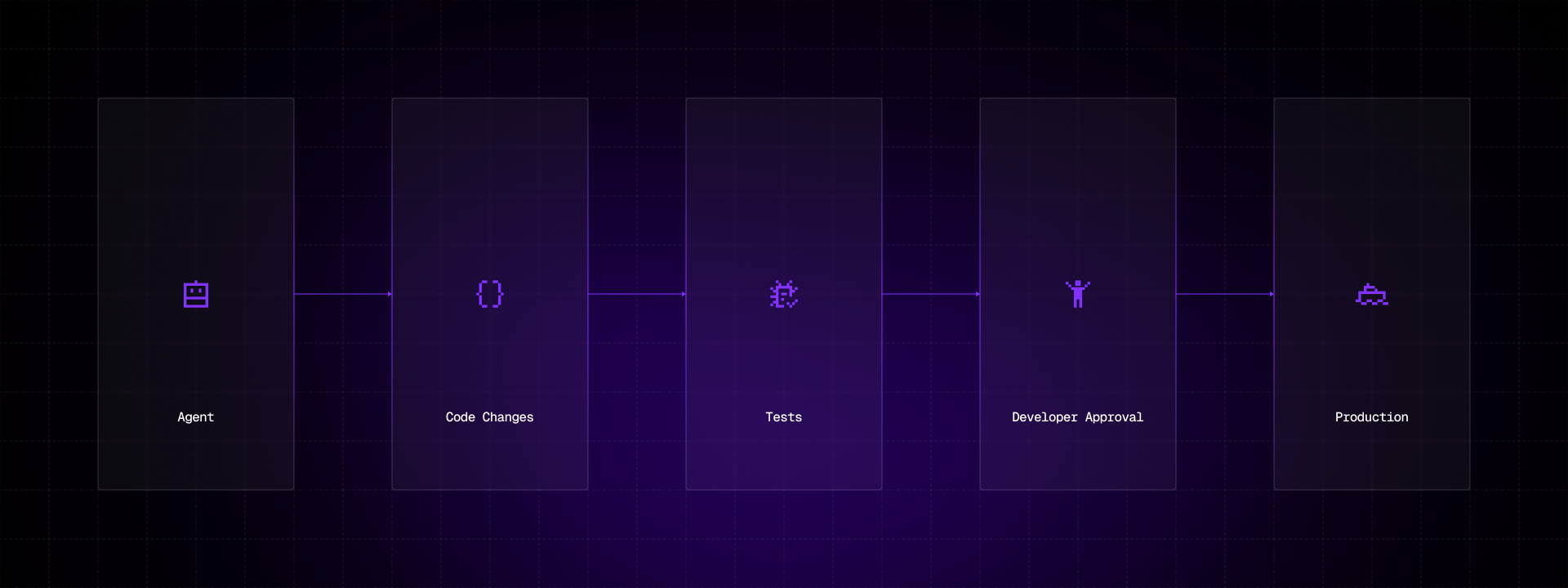
This goes to show that the importance of fast feedback loops can go a long way toward preventing small mistakes from snowballing into something you can't easily unwind. And that's precisely what separates a developer using AI for assistance from someone who just prompts: knowing when to stop, question, and rephrase before it’s too late.
Lesson 2: Complexity overload
AI is good at answering a concrete question, but not so good at looking at the bigger picture. It can significantly increase the complexity of a codebase without anyone noticing. Maybe the business case is put in a bad way, or maybe you haven’t asked the question in a sensible way. Simple is always better: the less code you write, the better it is in almost all cases.
An example of this is when, on one of my projects, I was working on a product listing page and fed the following AC directly to an agent:
Add functionality to filter products by category, price and availability so that I can find items faster.
What came back was a fully custom filter engine with its own state management, debouncing logic, URL sync, and a handful of utility functions, i.e. hundreds of lines of code for something that could have been handled with a few URL search params and a filtered array. The agent wasn't wrong; it was just solving a much bigger problem than I needed it to, and it was my fault for not stating the desired result in a more concise way.
The fix was going back and refining the AC before prompting again:
Add filtering to the product listing page using URL search params for category, price range and availability. Reuse the existing useFilters hook and FilterSelect component from the component library. No new abstractions.
The end result and the output were much simpler and more readable. Although it’s the same feature, it required a fraction of the code and nothing I didn’t already understand and own.
Complexity doesn't always announce itself, it often creeps in quietly, one over-engineered solution at a time. When in doubt, less is always more. The simplest solution that gets the job done is, as a rule, the right one.
Lesson 3: Know your domain
The more you understand your infrastructure, tech stack, and overall application, the better. You should aim to put the AI inside a frame and tell it exactly what your goals are, and always do extensive testing and review. Test everything, trust nothing.
The more constraints and context you give upfront, the less room the agent has to fill in the blanks with code you didn't ask for and don't need. A classic example of what can go wrong when you don't is asking an agent to fetch data without specifying your transport layer—in a GraphQL-based application, it might confidently generate a REST API call, missing the entire point of your architecture. It's not wrong in a vacuum, it's wrong for your domain.
This is where context engineering becomes a game-changer. Tools like agents.md, a conventions file that lives in your repo and tells the agent about your stack, patterns, and boundaries, are a practical way to frame every prompt before it even starts.
At Callstack, we took this further with agent-skills: a collection of agent-optimised React Native skills for AI coding assistants that encapsulate domain-specific knowledge your agent can draw from consistently across sessions. Instead of re-explaining your stack every time, you define it once and let the agent work within those boundaries.
Example agents.md file:
# Agent Guidelines

## Stack
- React Native (Expo) with TypeScript
- Navigation: React Navigation v7
- State management: Zustand
- Data fetching: GraphQL with Apollo Client (do NOT use REST or fetch directly)
- Styling: StyleSheet API with design tokens from `@/theme`
- Testing: Jest + React Native Testing Library + Maestro for E2E

## Project structure
- `src/components` — shared UI components, reuse before creating new ones
- `src/screens` — screen-level components, one file per screen
- `src/hooks` — custom hooks only, no business logic in components
- `src/store` — Zustand stores, one slice per domain

## Conventions
- All components must be typed — no `any`
- Use named exports only, no default exports
- Prefer composition over prop drilling
- No new third-party libraries without explicit approval
- All new components require a corresponding `.test.tsx` file

## Boundaries
- Never hardcode strings — use i18n keys from `src/locales`
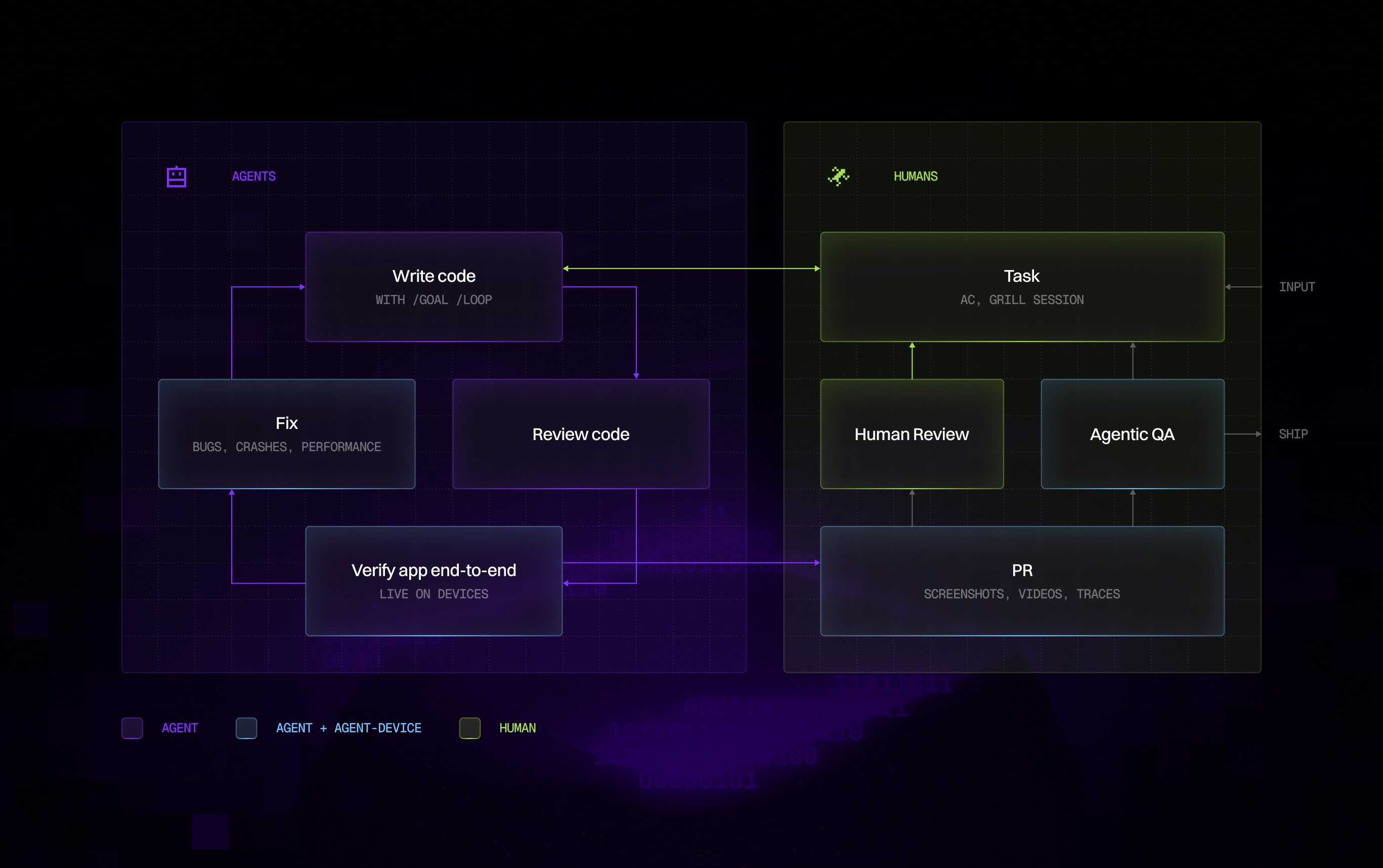
Another massive gain comes from giving agents the means to validate their output end-to-end, not just through code, but through actual runtime behaviour.
We built agent-device: a lightweight CLI for AI-driven mobile automation on iOS and Android. Rather than generating code and hoping it works, an agent equipped with agent-device can interact with a running app, observe what's actually happening on screen, and course-correct based on real feedback. That closes the loop in a way static code review simply can't.
Lesson 4: Describe first, prompt second
You should always try to describe the data you receive and how it is structured before making your request. Paste a raw JSON response returned from an endpoint if you have to. The more you describe upfront, the better the end result will be.
A practical example of this is asking an agent to build a user profile card component. A vague prompt like "build a user profile card" will get you something generic. Instead, paste the actual data you're working with:
{
  "user": {
    "id": "123",
    "firstName": "Hristo",
    "lastName": "Totov",
    "avatarUrl": "https://example.com/avatar.jpg",
    "isActive": true,
    "joinedAt": "2020-04-12T08:00:00Z",
    "stats": {
      "projectsCompleted": 42,
      "endorsements": 17
    }
  }
}
Now the agent knows the exact shape of the data, what's optional, what needs formatting, and what edge cases to handle like isActive toggling visibility or joinedAt needing to be converted to a readable date. The output will be typed correctly, structured around your actual data model, and require significantly less back-and-forth.
Another powerful technique that pairs well with this is running a grilling session before you prompt. Tools like grill-me, a skill that relentlessly interviews you about your plan, walking through each decision branch until a shared understanding is reached are a practical way to surface the unknowns you didn't know you had.
Rather than assuming you've described everything the agent needs, you let it stress-test your thinking first. What comes out of that session becomes the context for your actual prompt, and the result is almost always sharper.
Describing your data well gets you most of the way there, but it doesn't eliminate the need for review. Tools like CursorBot or CodeRabbit on GitHub PRs are a valuable addition to your workflow. They catch inconsistencies, flag potential issues, and add a layer of automated oversight. From my experience, they are an important asset and often flag major issues that a developer might have overlooked.
However, they are not a guarantee against bad design or bug-free software. It might tell you the code looks clean while it's quietly solving the wrong problem. Planning upfront is what prevents that—no review tool, automated or otherwise, can fully compensate for a poorly scoped prompt.
Lesson 5: Beware of the costs
Nowadays, agents don't just answer a single prompt. They plan, execute multiple steps, spawn sub-tasks, and iterate on their own output, all before you see a single result, therefore increasing the cost of each prompt.
Writing code the old-fashioned way, i.e. without an AI assistant, is like paying with physical money - you think about it many times before giving the money for what you're buying. AI tools are like paying with a card - it's so effortless and fast that you often neglect the price without giving it a second thought. The lesson isn't to stop using AI; it's to stop using it blindly.
That said, cost awareness cuts both ways. If you find yourself in a position where you have access to cheap or unlimited tokens, whether through an AI lab, a generous company spend policy, or a self-hosted model, then use it to your advantage.
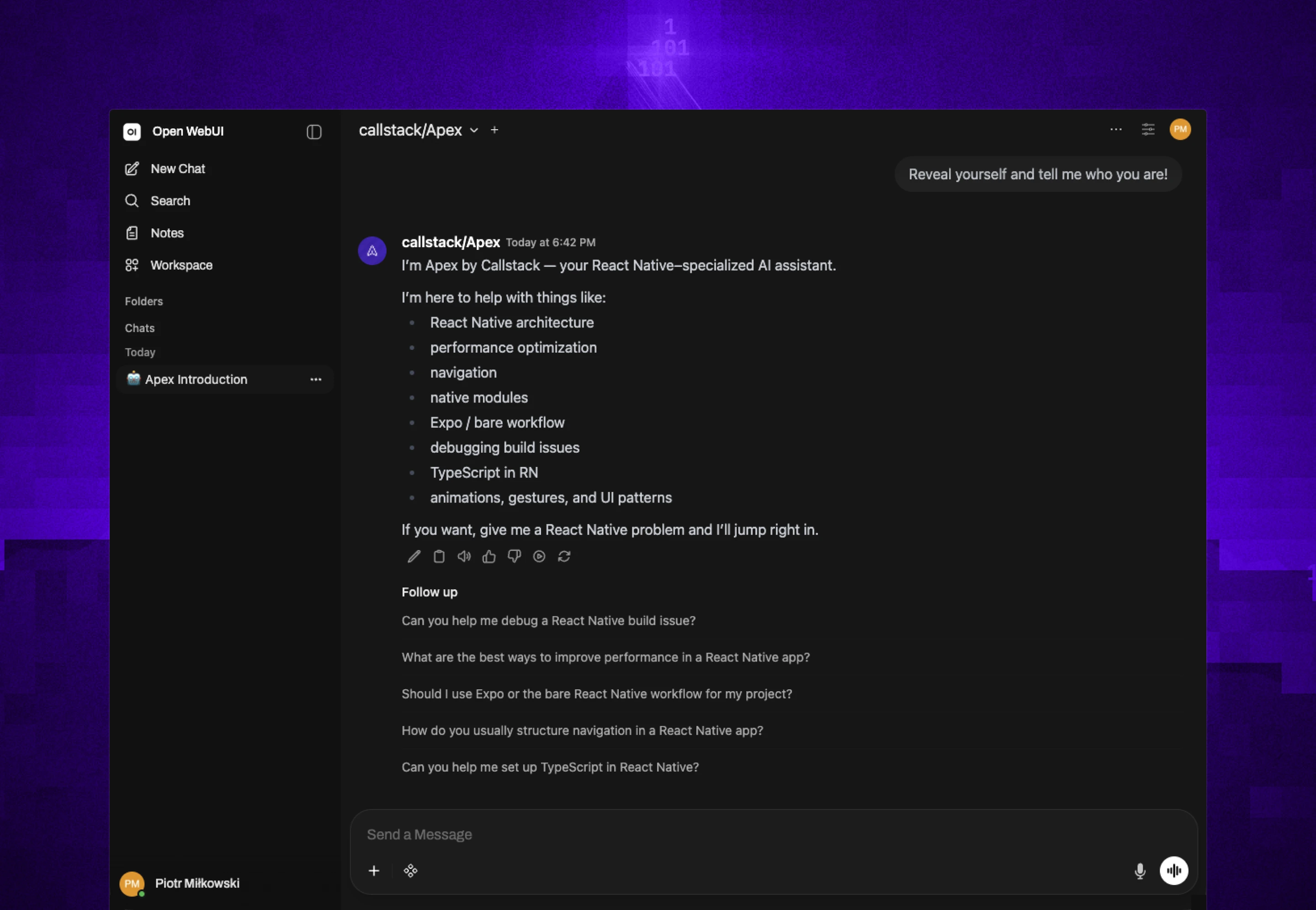
We took this seriously enough to build our own: Apex, a React Native coding model trained specifically for the engineering work we do every day. When token cost is no longer the bottleneck, the question shifts from "can I afford to ask this?" to "am I asking the right things?" which is a much better problem to have.
Beware of the costs doesn't mean being afraid of the tool but rather being deliberate about how you use it. Know what you're running, know what it's doing, and make sure the output is worth the spend.
If you can adopt a "tokenmaxxing" approach in any way (like deploying a capable model on your own infra), I strongly encourage you to do it. You don't want to be constrained by intelligence, do you? But the cost is still real, keep it in mind and make sure the ROI is there.
Conclusion
All in all, coding with AI agents is much more powerful than coding on your own. I’ve shipped things faster than I ever thought possible and solved problems I would have spent hours on alone. However, speed without awareness is just a very fast way to make a costly mess.
The five lessons I’ve shared are not rules set in stone; they are rather guardrails I wish I had known earlier. Know your craft, keep things simple, stay in control, and plan before you prompt, as the real cost isn't just tokens, it's the time spent fixing what you didn't catch.
AI-first development is only getting started, and it’s not going anywhere. We’re happy to embark on the journey and, more importantly, help others along for the ride!

Learn more about AI
Here's everything we published recently on this topic.