Apex is our specialized React Native coding model, built on Gemma 4 and tuned for the engineering work we do every day. But model quality was only half the challenge. To make Apex useful in production, we also had to make self-hosted Gemma fast, stable, and efficient on the hardware serving it.
Gemma 4 31B is large enough that inference speed depends as much on server setup as on the model itself. It needs GPU memory for weights, KV cache, multimodal encoders, and batching headroom. If the server reserves too much context, uses the wrong parallelism shape, or leaves unused multimodal capacity enabled, throughput drops quickly.
In this article, we show how we served google/gemma-4-31B-it on vLLM with two NVIDIA RTX PRO 6000 Blackwell Server Edition GPUs, then improved output-token throughput with the Gemma 4 MTP assistant checkpoint: 2.48x at max concurrency 1, 1.92x at max concurrency 10, and 1.09x at max concurrency 100.
TL;DR
- Use two GPUs for one Gemma 4 31B replica when you need long context or safer memory headroom.
- Prefer multiple TP2 replicas on an 8-GPU PCIe host when traffic is many normal-sized requests.
- Set
--max-model-lendeliberately; the full 256K context window is expensive - Disable unused modalities with
--limit-mm-per-prompt - Use
--async-schedulingon vLLM. - Enable Gemma 4 MTP when output throughput matters, then watch p99 latency.
NVIDIA provides the RTX PRO 6000 Blackwell Server Edition with 96 GB GDDR7, 24,064 CUDA cores, 1,597 GB/s memory bandwidth, and up to 600 W configurable power. In an 8-GPU server, that gives 768 GB of aggregate GPU memory, which is useful for multiple replicas or very large-context serving.
Software stack specification
Google Gemma 4 serving is new enough that runtime versions matter – full architecture support including MoE, multimodal, reasoning, and tool-use capabilities was introduced in vLLM v0.19.0, and it requires transformers >= 5.5.0. Recent vLLM builds support the model’s multimodal serving controls, async scheduling, multi-GPU deployment, and the Gemma 4 MTP assistant path (introduced in v0.21.0).
First: memory-oriented optimization
Gemma 4 31B is a dense 30.7B-parameter model with a 256K-token context window. A single 96 GB GPU can run constrained configurations, but the full model plus long-context KV cache leaves little room for serving. For a single-GPU server, reduce --max-model-len, for example to 16K tokens.
For this host, the cleaner production shape is:
- Use two GPUs for one Gemma 4 31B replica when you need long context or safer memory headroom.
- Use four independent two-GPU replicas across the 8-GPU node when you need higher aggregate QPS.
- Use four or eight GPUs for one replica only when very large contexts justify the extra cross-GPU communication.
Tensor parallelism helps the model and KV cache fit, but wider tensor-parallel groups add synchronization overhead. If traffic is mostly many medium prompts, four TP2 replicas are usually easier to keep busy than one TP8 replica. If traffic is dominated by huge-context requests, a wider TP group may be worth testing.
The vLLM startup KV-cache logs are a useful reality check:
Those full-window estimates are very conservative for real-world traffic, where prompts and completions are much shorter than 256K tokens. They still show valuable information about how much cache capacity each setup has, which helps estimate how well the server can absorb additional requests.
Baseline vLLM server setup
For a two-GPU Gemma 4 31B server, start with:
CUDA_VISIBLE_DEVICES=0,1 vllm serve google/gemma-4-31B-it \
  --tensor-parallel-size 2 \
  --gpu-memory-utilization 0.90 \
  --max-model-len 32768 \
  --enable-auto-tool-choice \
  --reasoning-parser gemma4 \
  --tool-call-parser gemma4 \
  --limit-mm-per-prompt '{"image": 4, "audio": 0}' \
  --async-scheduling \
  --host 0.0.0.0 \
  --port 8000
The --max-model-len flag is one of the highest-impact settings. If the application never sends more than 16K or 32K tokens, do not reserve memory for 256K-token requests. The saved memory becomes KV-cache capacity for useful concurrency.
The --limit-mm-per-prompt flag is also important. Gemma 4 31B supports text and image inputs; audio support belongs to the smaller E2B and E4B models. For a text-only service, use:
--limit-mm-per-prompt '{"image": 0, "audio": 0}'For an image service, set the image count to the real product limit. A server that accepts four images per prompt has a different memory profile than a text-only endpoint.
That is the right operational shape for a two-GPU serving group: busy GPUs, stable memory use, and no accidental work spread onto unrelated cards.
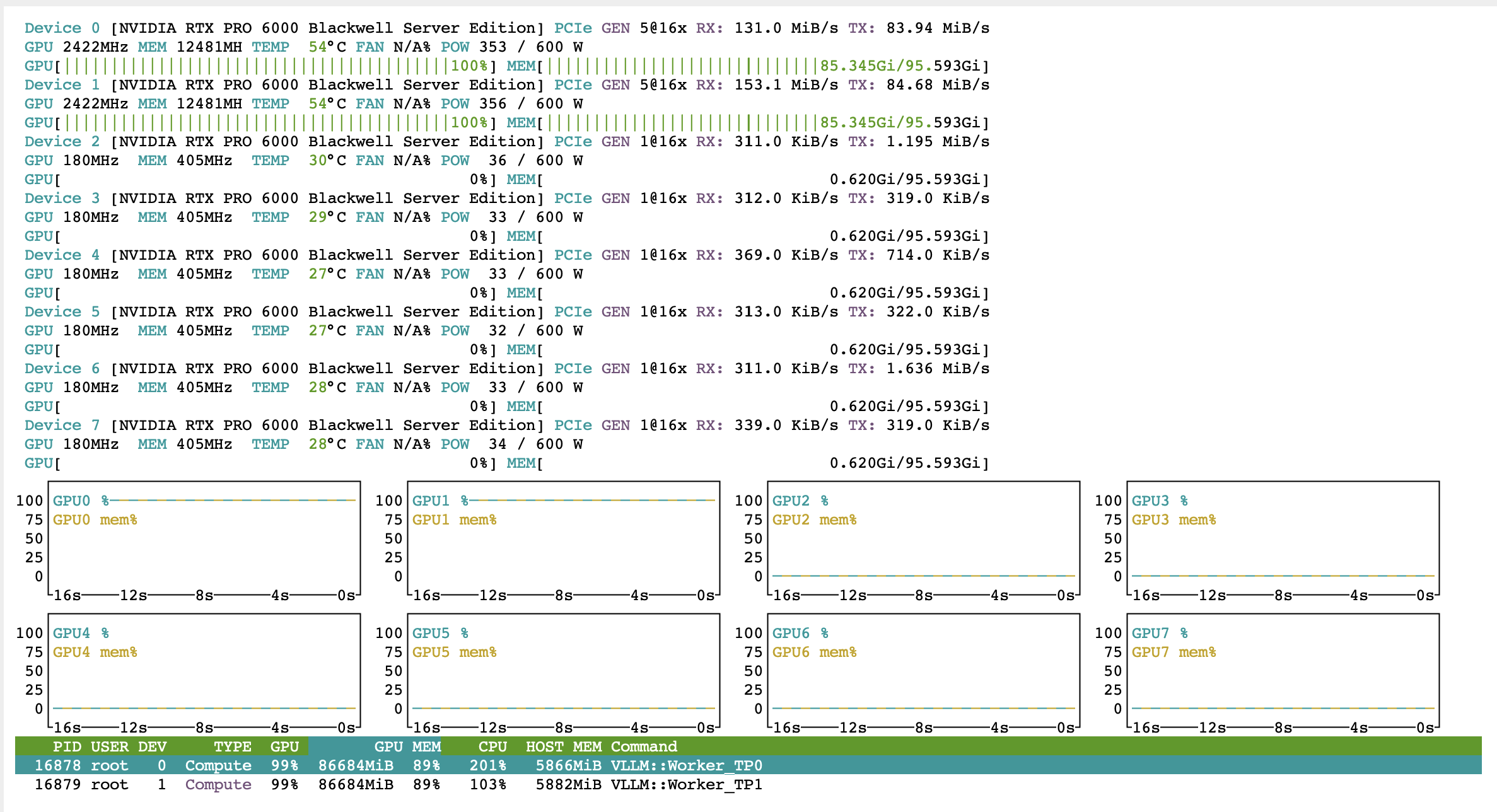
The two-GPU run keeps both vLLM workers close to 100% GPU utilization while using about 85 GiB of memory per active card.
Second: increasing performance with MTP
Gemma 4 Multi-Token Prediction uses speculative decoding. A lightweight assistant checkpoint predicts future tokens, and the main Gemma 4 model verifies them. When the predicted tokens are accepted, the server emits multiple tokens for the cost of fewer full target-model decoding steps.
For vLLM, serve the assistant checkpoint through --speculative-config:
CUDA_VISIBLE_DEVICES=0,1 vllm serve google/gemma-4-31B-it \
  --tensor-parallel-size 2 \
  --gpu-memory-utilization 0.90 \
  --max-model-len 32768 \
  --enable-auto-tool-choice \
  --reasoning-parser gemma4 \
  --tool-call-parser gemma4 \
  --limit-mm-per-prompt '{"image": 4, "audio": 0}' \
  --async-scheduling \
  --host 0.0.0.0 \
  --port 8000 \
  --speculative-config '{"method": "mtp", "model": "google/gemma-4-31B-it-assistant", "num_speculative_tokens": 4}'
In our benchmarks, we used num_speculative_tokens: 4. For latency-sensitive applications, start with 1 or 2 and increase only if p99 latency stays healthy. For throughput-first workloads, 4 is a reasonable setting to test.
Test results showed an MTP acceptance rate of 52 to 58%, with accepted length around 3.1 to 3.3 tokens. That was enough to improve output throughput, but it also raised time to first token. Treat MTP as a throughput tool that needs measurement, not a universal latency fix.
Benchmark results
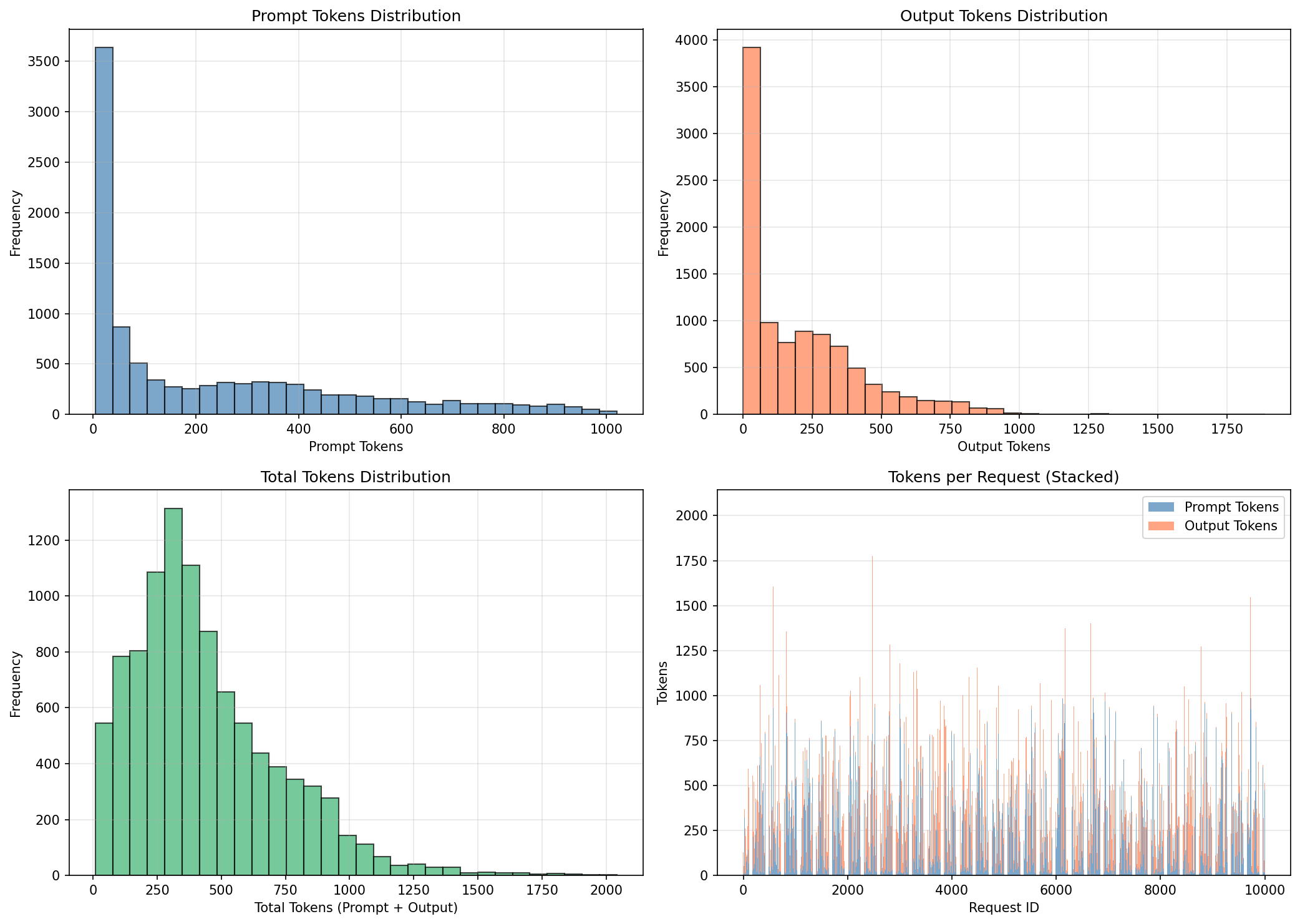
The vLLM benchmark used ShareGPT prompts through /v1/completions, with 100 prompts at concurrency 1, 1,000 prompts at concurrency 10, and 10,000 prompts at concurrency 100. All six runs used vllm bench online benchmarking and a TP2 setup.
At low and medium concurrency, MTP gives a large generation-speed improvement. At concurrency 1, mean time per output token drops from 23.89 ms to 10.33 ms. At concurrency 10, it drops from 29.70 ms to 16.61 ms.
At concurrency 100, the server is already heavily batched. MTP still improves output throughput, but only by about 9%, while p99 TPOT worsened. For heavily saturated services, replicas, routing, and context-length control may matter more than deeper speculation.
MTP increased mean and p99 TTFT in our tests. That may be acceptable for coding agents, background generation, and throughput-oriented APIs. For chat products where the first streamed token dominates perceived responsiveness, benchmark shallow MTP and baseline side by side.
Third: scaling the 8-GPU node
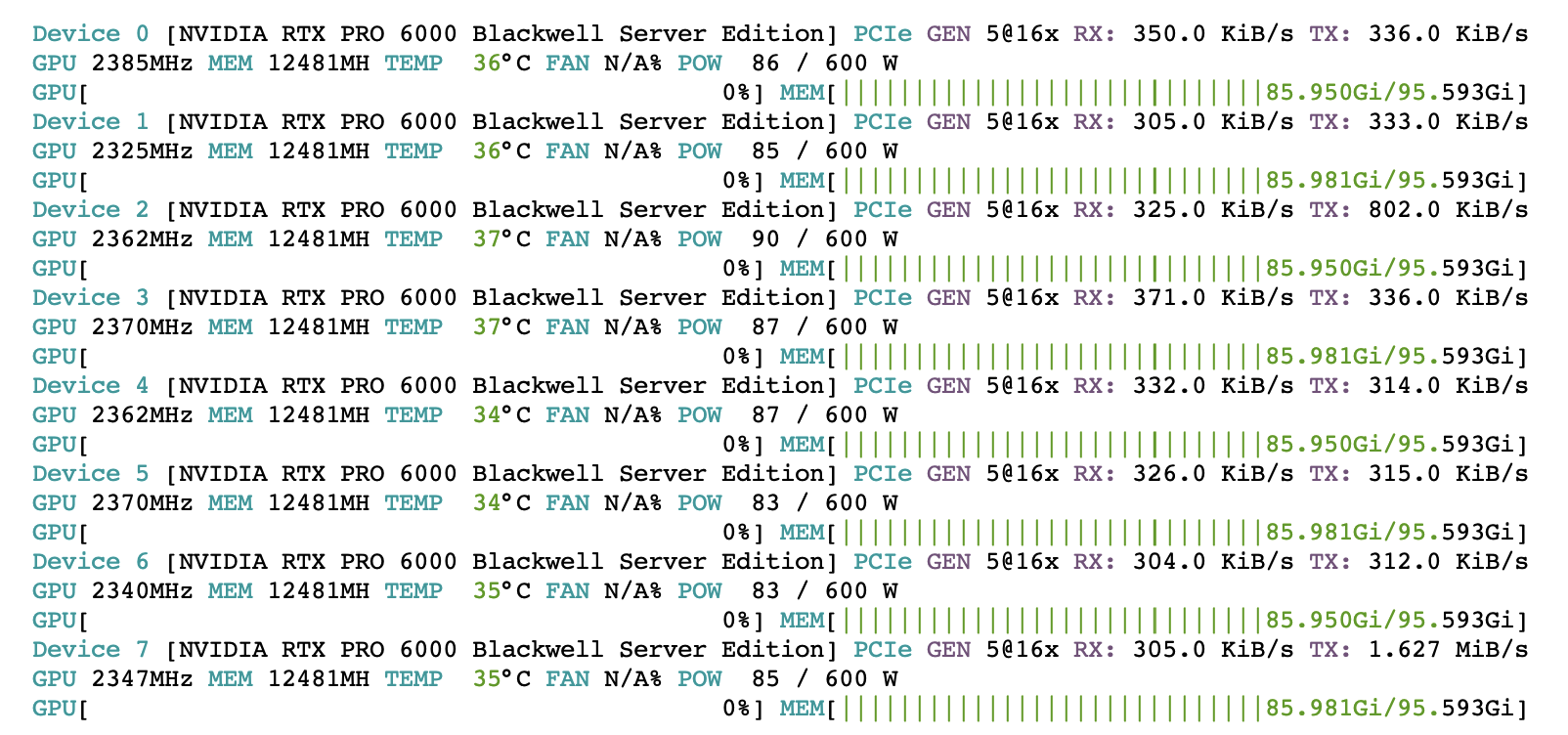
A wider serving group uses the same pattern: high utilization on active cards, around 86 GiB of memory used per GPU, and PCIe Gen5 x16 links carrying the inter-GPU traffic.
The best 8-GPU layout depends on traffic:
A four-replica layout can look like this:
CUDA_VISIBLE_DEVICES=0,1 vllm serve google/gemma-4-31B-it --tensor-parallel-size 2 --port 8000 ...
CUDA_VISIBLE_DEVICES=2,3 vllm serve google/gemma-4-31B-it --tensor-parallel-size 2 --port 8001 ...
CUDA_VISIBLE_DEVICES=4,5 vllm serve google/gemma-4-31B-it --tensor-parallel-size 2 --port 8002 ...
CUDA_VISIBLE_DEVICES=6,7 vllm serve google/gemma-4-31B-it --tensor-parallel-size 2 --port 8003 ...
Put a load balancer in front and route by least outstanding requests. Long prompts can occupy prefill time much longer than short prompts, so simple round-robin routing is often too naive.
Possible SGLang alternative
Gemma 4 was introduced in v0.5.11 and MTP is supported starting from v0.5.12. SGLang can serve the same model with tensor parallelism:
CUDA_VISIBLE_DEVICES=0,1 sglang serve \
  --model-path google/gemma-4-31B-it \
  --tp-size 2 \
  --reasoning-parser gemma4 \
  --tool-call-parser gemma4 \
  --mem-fraction-static 0.9 \
  --host 0.0.0.0 \
  --port 30000
The MTP-style SGLang launch uses NEXTN with the Gemma 4 assistant checkpoint:
CUDA_VISIBLE_DEVICES=0,1 sglang serve \
  --model-path google/gemma-4-31B-it \
  --tp-size 2 \
  --speculative-algorithm NEXTN \
  --speculative-draft-model-path google/gemma-4-31B-it-assistant \
  --speculative-num-steps 5 \
  --speculative-num-draft-tokens 6 \
  --speculative-eagle-topk 1 \
  --reasoning-parser gemma4 \
  --tool-call-parser gemma4 \
  --mem-fraction-static 0.9 \
  --host 0.0.0.0 \
  --port 30000
What should I check before serving an LLM in production?
Before calling a Gemma 4 inference server fast, check:
- Confirm exact model, driver, CUDA, vLLM/SGLang, PyTorch, and Transformers versions
- Pin GPUs with
CUDA_VISIBLE_DEVICES - Record startup KV-cache size and max-concurrency estimate
- Match
--max-model-lento the production prompt budget - Set
--gpu-memory-utilizationaround 0.90 to 0.95 and test under load - Disable unused modalities with
--limit-mm-per-prompt - Enable
--async-schedulingon vLLM - Run benchmarks against the same endpoint, dataset shape, prompt length, output length, and concurrency expected in production
- Track output tok/s, request/s, TTFT, TPOT, p99 latency, failures, and GPU memory together
- Track MTP acceptance rate and accepted length when speculative decoding is enabled
- Prefer TP2 replicas on 8-GPU PCIe servers unless long context requires a wider TP group
- Calculate cost per output token from the GPUs actually in use
If you’re looking to optimize your Gemma model, it’s worth checking out the official Gemma skills from Google. They help agents build with Gemma and already include some of the optimization techniques covered in this article.
Google shared more here: Gemma skills announcement.
Conclusions
Fast Gemma 4 inference comes from matching the server to the workload. Gemma 4 31B needs enough VRAM for both weights and KV cache, a context limit that matches real prompts, a batching setup that keeps GPUs busy, and a deployment layout that respects PCIe topology.
On this RTX PRO 6000 Blackwell Server Edition host, the practical default is a two-GPU tensor-parallel vLLM replica. MTP is valuable when output-token throughput matters: it delivered 2.48x higher output throughput at concurrency 1 and 1.92x at concurrency 10 in the ShareGPT benchmark. At concurrency 100, the gain fell to 1.09x and tail latency worsened.
For production, use TP2 replicas for normal traffic, wider TP groups for very long contexts, and MTP when the workload can absorb the time-to-first-token tradeoff.

Learn more about AI
Here's everything we published recently on this topic.