Most AI-powered apps look the same: a text input, a streaming response, maybe some markdown rendering. The model is doing something interesting; the UI is a chat box dressed up in the product's branding.
That's fine for a lot of use cases. But it leaves something on the table. The model already knows the user's context, their intent, what they've already said. It could be doing more than generating text. It could be generating the interface itself.
That's what generative UI is.
The idea
Instead of the model returning text that the UI displays, the model returns a description of the interface: which components to render, what they contain, what actions they expose. The client renders that description into real components. The user interacts. Their input feeds back into the next prompt.
The model decides what the user sees, and the client decides how to render it.
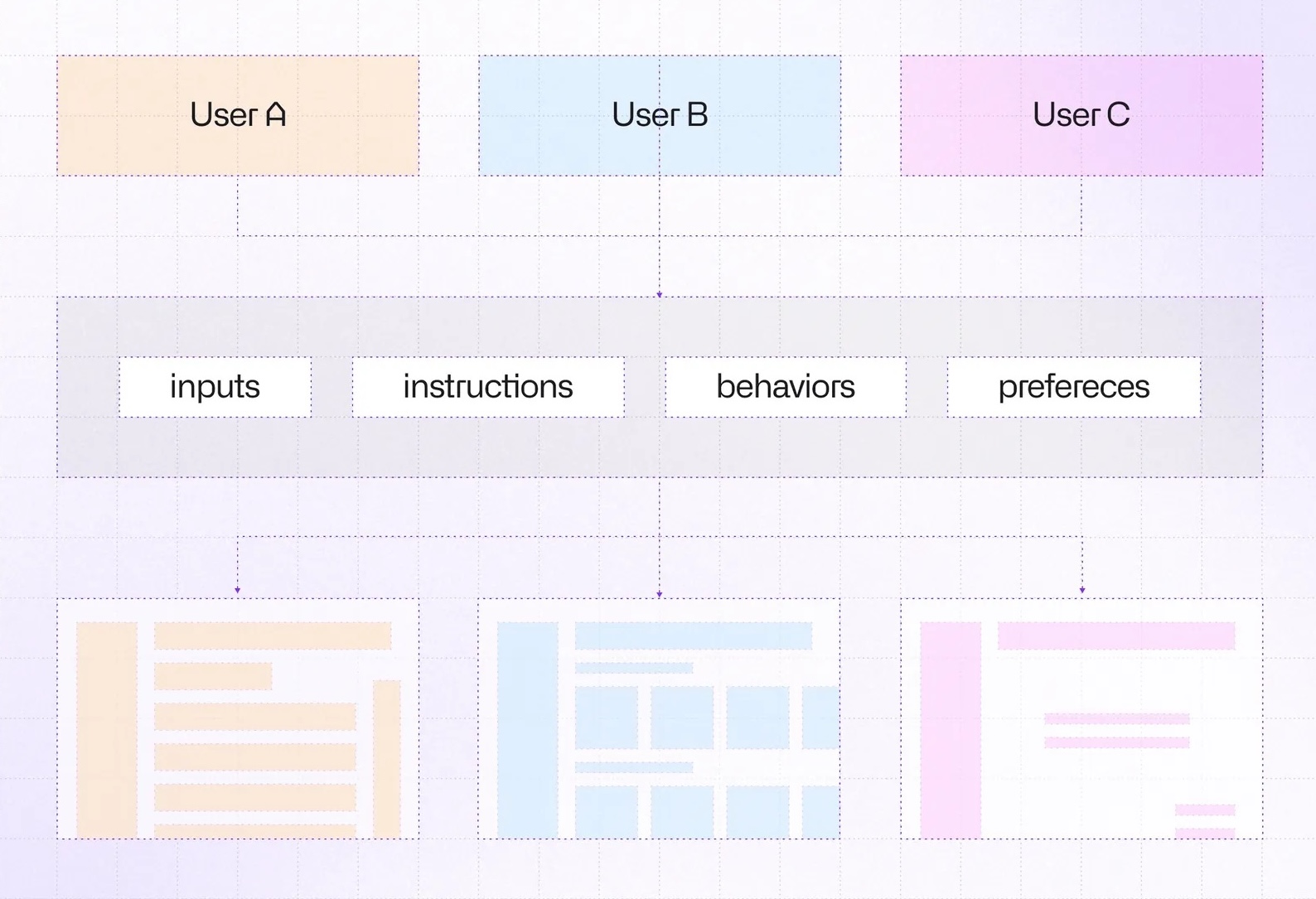
This is a meaningful shift. In a traditional app, the UI is decided at build time. In a generative UI app, it's decided at runtime, per user and per context.
From model output to React
Instead of returning text, the model returns a JSON description of the interface, such as component names, props, children, and how they interact:
import { defineCatalog } from '@json-render/core'
import { schema } from '@json-render/react/schema'
import { z } from 'zod'

export const interviewCatalog = defineCatalog(schema, {
  components: {
    TextField: {
      props: z.object({
        id: z.string(),
        label: z.string(),
        required: z.boolean().default(false),
        value: z.string().nullable(),
      }),
    },
    Button: {
      props: z.object({ label: z.string().default('Continue') }),
      description: "Bind on.press to action requestNextStep with params.formData as {$state:'/answers'}",
    },
  },
  actions: {
    requestNextStep: {
      params: z.object({
        formData: z.record(z.string(), z.unknown()).optional()
      }),
      description: 'Submit current answers and request the next step.',
    },
  },
})
But how does the model know what to emit?
JSON Render provides a built-in helper that generates a system prompt directly from the catalog. Pass it as your system prompt and the model knows exactly what it can render:
import { streamText } from 'ai'
import { anthropic } from '@ai-sdk/anthropic'

function handleRequest() {
  const result = streamText({
    model: anthropic('claude-opus-4-6'),
    system: interviewCatalog.prompt({ mode: 'generate' }),
  })
  return result.toTextStreamResponse()
}
Given those instructions, the model might return this:
[
  {
    "type": "TextField",
    "props": {
      "id": "full_name",
      "label": "Full name",
      "value": { "$bindState": "/answers/full_name" }
    }
  },
  {
    "type": "ContinueButton",
    "props": {
      "label": "Continue"
    },
    "on": {
      "press": {
        "action": "requestNextStep",
        "params": { "formData": { "$state": "/answers" } }
      }
    }
  }
]
The model doesn't write React. It emits data conforming to the catalog schema. Something else has to turn that into a live component tree. That's the registry.
The registry
The registry is the rendering-facing counterpart to the catalog. It maps the same component names to real React implementations.
Each component receives element (the props from the JSON spec), bindings (for live state), and emit (for triggering actions):
import type { ComponentRegistry } from "@json-render/react";
import { useBoundProp } from "@json-render/react";

export const registry: ComponentRegistry = {
  TextField: ({ element, bindings }) => {
    const [value, setValue] = useBoundProp(
      element.props.value,
      bindings?.value,
    );
    return (
      <div>
        <label htmlFor={element.props.id}>
          {element.props.label}
        </label>
        <input value={value} onChange={(e) => setValue(e.target.value)} />
      </div>
    );
  },
  ContinueButton: ({ element, emit }) => (
    <button onClick={() => emit("press")}>
      {element.props.label}
    </button>
  ),
};
useBoundProp syncs the input's value with the state path the model declared in $bindState. emit('press') dispatches the action bound in on.press.
Putting it all together
On the app side, you register named action handlers and pass the registry (not the catalog; that's server-side) to JSONUIProvider. useUIStream streams the JSON spec from your API and updates spec incrementally as chunks arrive:
const { spec, isStreaming, send } = useUIStream({ api: '/api/interview-step' })

const handlers = {
  requestNextStep: async ({ formData }) => {
    await send('Generate next step.', { formData })
  },
}

function App() {
  return (
    <JSONUIProvider
      registry={registry}
      handlers={handlers}
      initialState={{ answers: {} }}
    >
      <Renderer spec={spec} loading={isStreaming} />
    </JSONUIProvider>
  )
}
It's worth noting: send is designed for chat-style interfaces. Calling it fires a new request to the server and automatically streams the response back into spec. The UI refreshes without any extra wiring on your end.
Enter FormOS
A good way to make this concrete is to walk you through a project I built recently for Claude Hackathon: FormOS.
The premise: PDF forms are universally painful. They were designed for print, not for people. Every field is static, the order is arbitrary, nothing adapts to your situation. FormOS treats a PDF form as an interview to be conducted rather than a document to be filled. The model reads the form, understands the user's intent, and generates the interview UI step by step.

Everything on screen (inputs, labels, guidance text, buttons) is produced by the model in real time. There's no hardcoded form flow anywhere in the codebase.
It's a clean demonstration of generative UI under real conditions: an unknown document, an unknown user, and a UI that has to adapt to both.
When the user clicks the button, the requestNextStep handler sends the current form answers to the server. The API appends the new step to the session's interview history and rebuilds the conversation for the model.
The model reads the PDF, the full conversation so far, and decides what to ask next. The response streams back as a new JSON spec, and the renderer replaces the current step with the next one.
What's next: Code execution in containers
Once the model decides it has collected enough information, it stops emitting ContinueButton and instead renders a ReadyNotice and an ExportPdfButton with an on.press action bound to exportFilledPdf. The user sees "ready to export" without any hardcoded condition in application code; the model made that call.
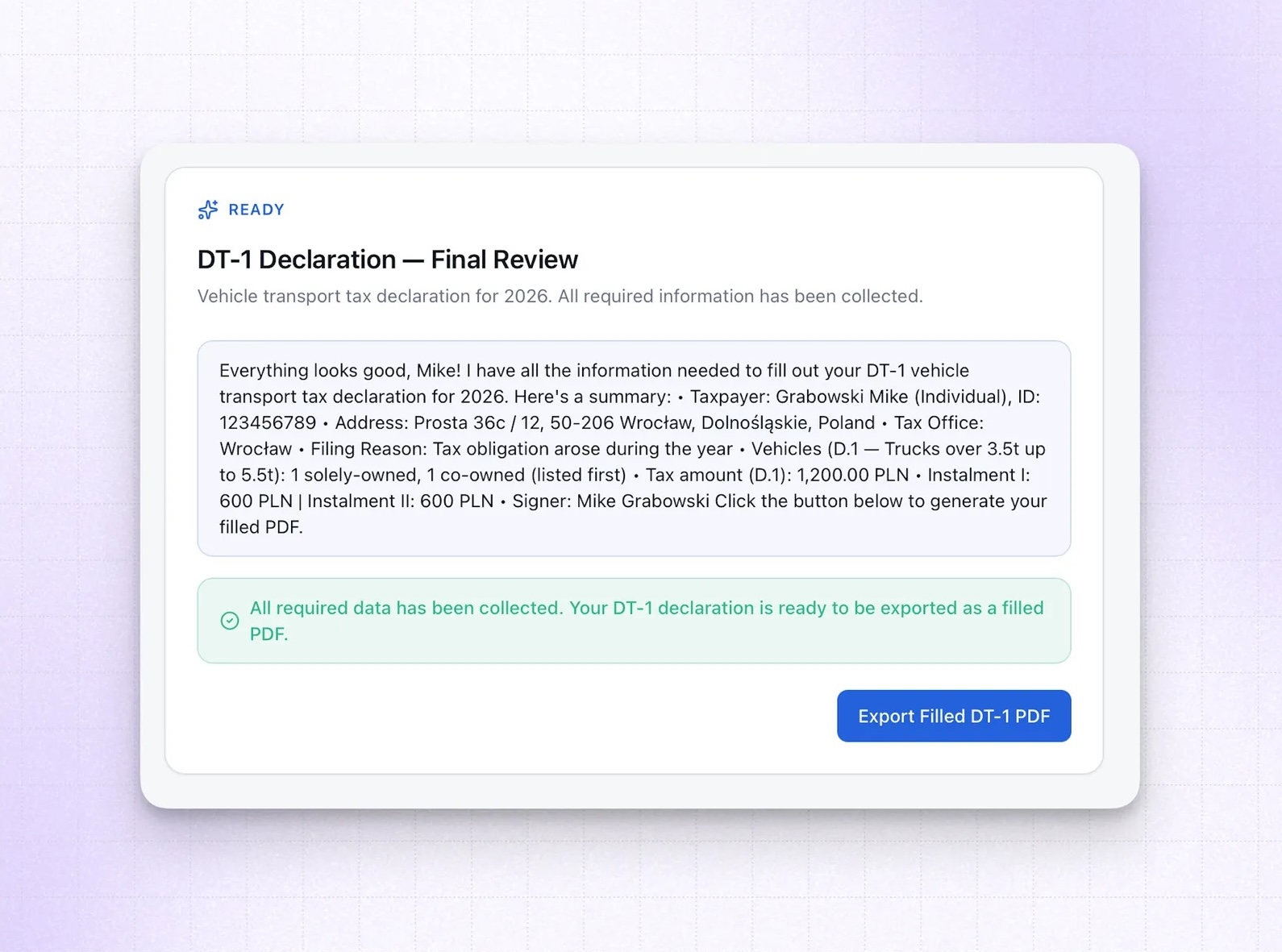
Pressing the button triggers Anthropic's Code Execution API to actually fill the PDF. Claude runs Python in a sandboxed container, manipulates the document, and returns the completed file.
That part (containers, code execution, the Skills API) is interesting enough to deserve its own article. The short version: you can give the model a real runtime, load pre-built capability packages into it, and have it produce artifacts rather than just text. The implications go well beyond PDF filling.
Where this is going
Generative UI is still early. Latency is a real constraint. Catalog design and prompt engineering take iteration. But the core idea is solid: when the model knows the context, it can make better decisions about the interface than any static flow you'd design up front.
The catalog is your design system. The prompt rules are your UX spec. The model is the product manager making decisions at runtime.

Learn more about AI
Here's everything we published recently on this topic.