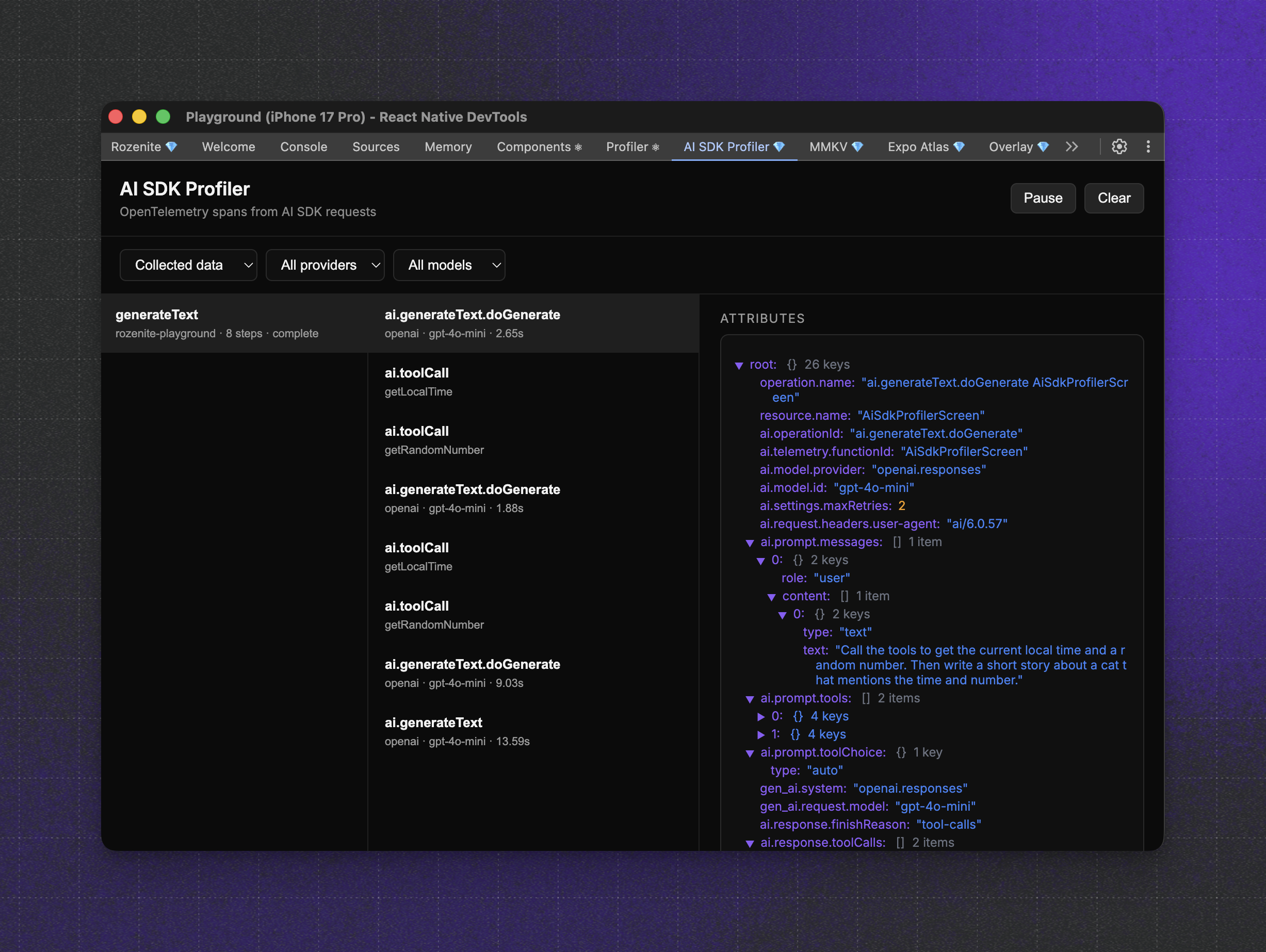
We just added a new DevTools plugin to the React Native AI ecosystem: AI SDK Profiler (@react-native-ai/dev-tools-plugin). It captures OpenTelemetry spans from the Vercel AI SDK and renders them inside Rozenite DevTools, so you can inspect prompts, responses, provider metadata, and latency in one place.
What’s the new feature?
AI SDK Profiler gives you a dedicated panel for AI SDK calls. It shows the request timeline, inputs and outputs, and provider details in a clean, local DevTools view. If you are profiling text generation, embeddings, speech, or transcription, the plugin makes it obvious where time is spent and what the SDK is doing.
What is Rozenite?
Rozenite is a React Native DevTools plugin framework. Install a plugin, and it appears inside React Native DevTools without extra windows or servers. It supports Expo and bare React Native, works with Metro or Re.Pack, and keeps plugin code out of production builds. In short, it’s a place to build and run focused DevTools panels for React Native.
How it works under the hood
The Vercel AI SDK already emits OpenTelemetry spans when telemetry is enabled. The plugin hooks into that stream:
- The AI SDK generates spans for each request.
- The plugin’s tracer records those spans and forwards them through the Rozenite plugin bridge.
- Rozenite DevTools renders them live in the AI SDK Profiler panel.
The DevTools are runtime agnostic, so you can inspect spans from on-device providers and cloud providers, all profiled through the same UI. If the AI SDK can emit spans for it, the plugin can show it.
Getting started
Integration is straightforward.
Before continuing, make sure you have Rozenite set up. If you haven’t done it yet, follow the Rozenite getting started guide to install and configure it.
Install the AI SDK DevTools package:
$ npm install @react-native-ai/dev-tools-pluginThen, configure the plugin within your React Native application:
import {
  getAiSdkTracer,
  useAiSdkDevTools,
} from '@react-native-ai/dev-tools-plugin';

export function App() {
  useAiSdkDevTools();

  return <RootNavigator />;
}
Finally, enable telemetry on selected AI SDK calls:
import { generateText } from 'ai';
import { openai } from '@ai-sdk/openai';
import { getAiSdkTracer } from '@react-native-ai/dev-tools-plugin';

const tracer = getAiSdkTracer({
  serviceName: 'my-app',
});

await generateText({
  model: openai('gpt-4o-mini'),
  prompt: 'Write a short story about a cat.',
  experimental_telemetry: {
    isEnabled: true,
    tracer,
    functionId: 'unique-identifier-where-the-call-comes-from',
  },
});
After performing all the steps, go to your React Native application, toggle Dev Tools and look for AI SDK Profiler to inspect the spans.
Feedback welcome!
If you are using the AI SDK in React Native, give the plugin a try. It’s fast to set up, and it makes profiling AI workflows much easier.
Let us know what works, what’s missing, and what you want next. Your feedback will shape the next release!
You can do so (and star the repo) here on GitHub.



Learn more about Developer Experience
Here's everything we published recently on this topic.