Introducing Brownie: Type-Safe Shared State for React Native Brownfield Apps

We're excited to announce the alpha release of Brownie (@callstack/brownie), a shared state management library designed specifically for React Native brownfield applications.
The Problem
Brownfield apps are existing native applications with React Native integration that face a fundamental challenge: shared state.
Your native settings screen shows the user's profile. Your React Native checkout flow needs that same user data. An authentication token refreshed in Swift needs to be available in React Native immediately. Theme preferences changed in one place should reflect everywhere.
From our experience working with clients, we've noticed a recurring pattern: every app ends up building its own proprietary Turbo Module for data sharing. Each team reinvents the wheel: writing custom native modules, maintaining type definitions on both sides, and constantly updating these modules as requirements change.
One of the examples is the Brownfield integration at Zalando. You can read about it here.
This is the main pain point of brownfield development today. These homegrown solutions are:
- Time-consuming to build: Writing Turbo Modules requires native expertise on each platform.
- Tedious to maintain: Every schema change means updating TypeScript, Swift, and Kotlin.
- Hard to keep in sync: Types drift apart, leading to runtime crashes.
- Duplicated across the industry: Every brownfield team solves the same problem from scratch.
Our Approach
Brownie takes a different path. Instead of treating React Native and native code as separate worlds, we created a single source of truth accessible from both TypeScript and Swift.
One key design decision is that state lives on the native side. This means your native app can read and write to the store independently of React Native. React Native can start in its own time. When it's ready, it will pick up the current state automatically.
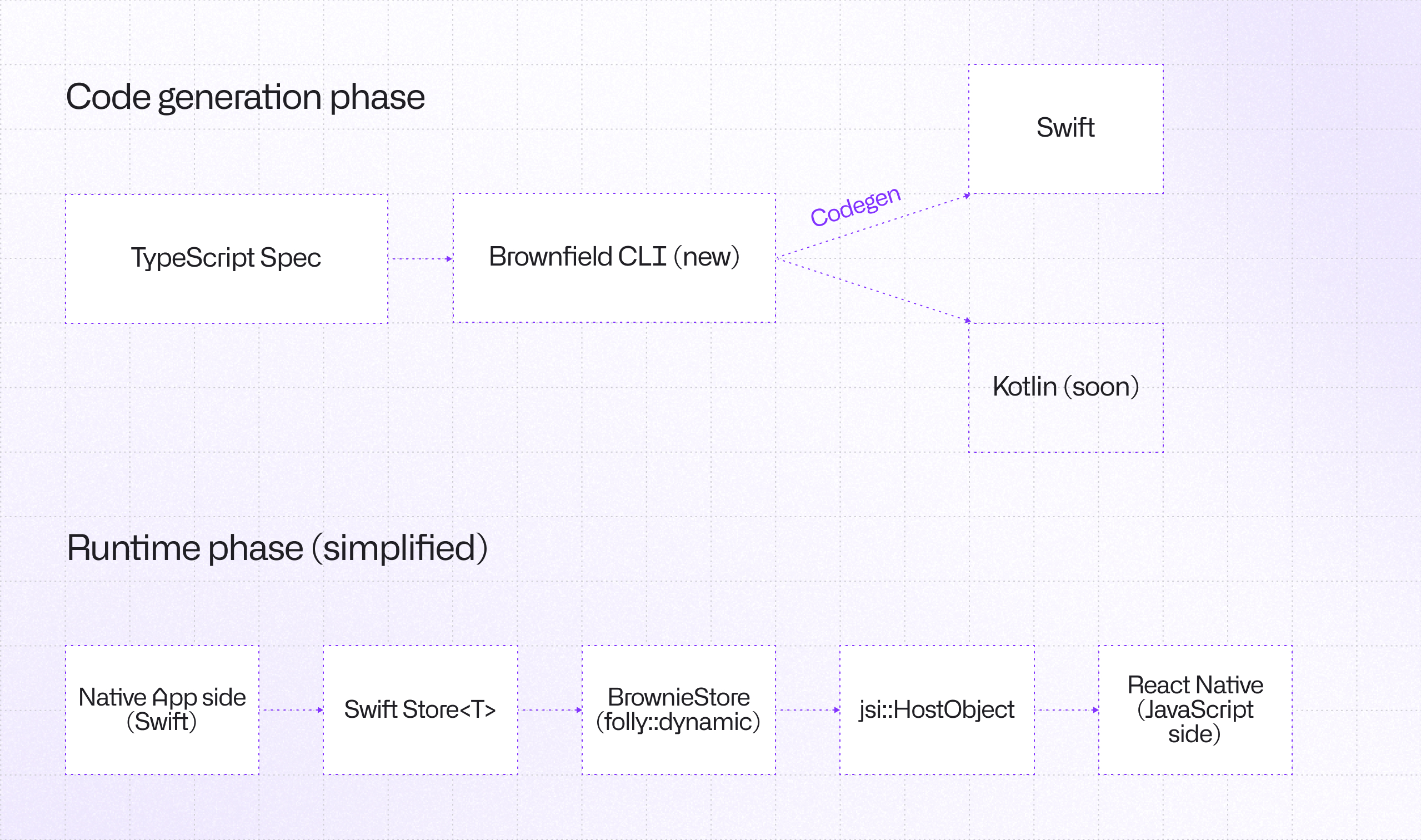
The architecture is straightforward:
- Define your state shape once in TypeScript
- Generate native types automatically via CLI
- Access the same state from both React Native and Swift
- Always retrieve up to date state thanks to bi directional sync
Under the hood, state lives in a C++ layer, exposed to JavaScript via JSI and to Swift via an Objective-C++ bridge.
How It Works
1. Define Your Store
Create a *.brownie.ts file with your state shape:
// AppStore.brownie.ts
import type { BrownieStore } from '@callstack/brownie';

interface AppStore extends BrownieStore {
  counter: number;
  user: {
    name: string;
    email: string;
  };
  settings: {
    theme: 'light' | 'dark';
    notificationsEnabled: boolean;
  };
}

declare module '@callstack/brownie' {
  interface BrownieStores {
    AppStore: AppStore;
  }
}
2. Build XCFrameworks
The brownfield CLI handles codegen and packaging in one step:
npx brownfield package:ios --scheme YourScheme --configuration Release
This generates Swift types from your .brownie.ts files and builds everything into XCFrameworks:
YourScheme.xcframework- Your React Native moduleBrownie.xcframework- Shared state libraryReactBrownfield.xcframework- Brownfield integrationhermesvm.xcframework- JavaScript engine
Drag these into your native Xcode project and set to Embed & Sign.
The generated Swift structs match your TypeScript schema exactly:
// Generated automatically
struct AppStore: Codable, Equatable {
    var counter: Double
    var user: User
    var settings: Settings
}

struct User: Codable, Equatable {
    var name: String
    var email: String
}
Note: Generated code is already included in Brownie.xcframework
3. Use in React Native
The useStore hook provides familiar React patterns with selector support:
import { useStore } from '@callstack/brownie';

function Counter() {
  const [counter, setState] = useStore('AppStore', (s) => s.counter);

  return (
    <Button
      title={`Count: ${counter}`}
      onPress={() => setState((prev) => ({ counter: prev.counter + 1 }))}
    />
  );
}
Selectors ensure components only re-render when their selected slice changes, just like you'd expect from a modern state library.
4. Use in SwiftUI
The @UseStore property wrapper brings the same ergonomics to SwiftUI:
import Brownie

struct CounterView: View {
  @UseStore(\\AppStore.counter) var counter

  var body: some View {
    VStack {
      Text("Count: \\(Int(counter))")

      Button("Increment") {
        $counter.set { $0 + 1 }
      }
    }
  }
}
KeyPath selectors provide type-safe access and optimal re-renders. The projected value ($counter) returns a standard SwiftUI Binding, so it works seamlessly with built-in controls like Stepper, Slider, and TextField.
5. UIKit Support
For UIKit apps, use the subscription-based API:
class CounterViewController: UIViewController {
  private var store: Store<AppStore>?
  private var cancelSubscription: (() -> Void)?

  override func viewDidLoad() {
    super.viewDidLoad()
    store = StoreManager.get(key: AppStore.storeName, as: AppStore.self)

    cancelSubscription = store?.subscribe(\\.counter) { [weak self] counter in
      self?.updateLabel(counter)
    }
  }

  deinit {
    cancelSubscription?()
  }
}
Why We Built This
At Callstack, we work with many teams integrating React Native into existing native apps. After seeing the same pattern repeat (teams building custom Turbo Modules for data sharing, then spending ongoing effort maintaining them), we decided to solve this once and for all.
Brownie replaces those proprietary data-sharing modules with a standardized solution. Instead of writing and maintaining your own native code for state synchronization, you define your schema in TypeScript and let Brownie handle the rest.
We wanted something that:
- Eliminates custom native modules: No more writing Turbo Modules just to share data.
- Feels native on both sides: React hooks in JS, property wrappers in Swift.
- Is type-safe end-to-end: TypeScript schema generates Swift types automatically.
- Stays in sync automatically: One schema, generated types, no manual updates.
Current Status: Alpha (iOS Only)
This is an early alpha release. We're shipping iOS support first to gather feedback and iterate on the API before expanding to Android.
What works today:
- SwiftUI integration with
@UseStoreproperty wrapper - UIKit integration with subscribe-based API
- React Native
useStorehook with selectors - Multiple stores support
- Nested objects and complex types
- Automatic codegen for Swift types
- XCFramework packaging via CLI
Known limitations:
- iOS only (Android coming soon)
- Full state sync on updates (partial sync optimization planned)
- APIs may change based on feedback
We Want Your Feedback
This is an early alpha release and we're actively seeking feedback. If you try Brownie, let us know what works, what doesn't, and what's missing for your use case.
Open an issue on GitHub with your thoughts.
Brownie is part of the React Native Brownfield project. Check out the documentation for detailed guides on store definitions, codegen configuration, and platform-specific usage.

Learn more about Brownfield
Here's everything we published recently on this topic.