Build performance work is rarely about one silver bullet. More often, it comes from removing unnecessary work, moving expensive operations to the right phase, and making the build pipeline easier for Gradle to reason about.
That is what we did in the latest Brownfield Gradle Plugin optimization.
In PR https://github.com/callstack/react-native-brownfield/pull/237, we reworked the plugin internals around a simple goal: stop doing too much too early. The result is a cleaner, more variant-aware Gradle pipeline and a measured 22% improvement in clean release builds for the Brownfield Android Modules consuming the brownfield-gradle-plugin.
The problem: configuration-time work was costing us
The Brownfield Gradle Plugin helps package React Native code and its Android dependencies into a form that can be consumed by an existing native Android application. In brownfield setups, this matters a lot: teams are usually integrating React Native incrementally, inside an already complex native build.
Before this optimization, the plugin did more work during Gradle’s configuration phase than it needed to. In particular, artifact resolution and variant processing were tightly coupled. A central VariantProcessor coordinated multiple responsibilities: exploding AARs, merging manifests, wiring resources and assets, handling JNI libraries, merging ProGuard rules, and preparing data binding-related pieces.
That design worked, but it made the plugin heavier than necessary. It also meant some expensive operations were triggered before Gradle had enough context to execute them efficiently.
The core idea behind the refactor was to split the pipeline into smaller, task-driven pieces and defer expensive work until execution time.
The fix: move from eager resolution to a task-driven pipeline
The new implementation introduces a lightweight dependency model called UnresolvedArtifactInfo.
Instead of resolving and processing artifacts too early, the plugin first collects lightweight metadata about what needs to be included. That metadata is then passed into variant-specific tasks, where the actual work happens at the right time.
In practice, this means the plugin now follows a clearer sequence:
- Collect lightweight dependency metadata.
- Register variant-specific tasks.
- Resolve and explode AARs during task execution.
- Wire outputs into manifest, resources, assets, JNI, ProGuard, data binding, and class transformation steps.
This is a big architectural improvement because it separates “what should be packaged?” from “when should we do the packaging work?”
Example: AAR exploding became a real task
One of the most important changes is the introduction of a dedicated ExplodeAarTask.
Previously, AAR handling was part of a broader variant-processing flow. Now, exploding AARs has a dedicated task with explicit inputs such as the variant name, minification state, and artifact metadata.
That gives the build a more natural shape:
- Gradle configures the task.
- The task receives unresolved artifact metadata.
- At execution time, the task validates that each AAR file exists.
- It unzips each AAR into the expected output directory.
- It runs the class merge steps for the variant.
This makes the lifecycle easier to understand and easier to optimize. It also produces better failure messages. For example, if an artifact file is missing, the task now fails with a clear error explaining which artifact and variant failed, instead of hiding that failure inside a larger processing step.
Example: variant processing is now composed, not monolithic
Another key improvement is how each Android variant is handled.
The plugin now configures work per LibraryVariant, but instead of delegating everything to one large processor, it wires dedicated processors and task providers:
ExplodeTaskProviderhandles AAR explosion.ManifestTaskProcessorhandles manifest merging.ResourceTaskProcessorwires generated resources.AssetTaskProcessorwires exploded AAR assets.JNILibsProcessorhandles native libraries.ProguardProcessorhandles consumer and generated ProGuard files.VariantTaskProviderwires pre-build, bundle, and data binding tasks.
This makes the pipeline more explicit. Each processor has a narrower responsibility, and each variant gets the tasks it needs without carrying unnecessary coupling from unrelated steps.
For maintainers, this matters as much as the speedup. A plugin that is easier to reason about is easier to keep fast.
Example: Expo dependencies are handled more deliberately
The PR also improves the Expo integration path.
Expo dependencies can be linked in more than one way: as local project dependencies or as locally published Maven artifacts. The new resolver accounts for both. It reads Expo’s api configuration, adds relevant dependencies to the Brownfield consumer project, and records lightweight unresolved artifact metadata for later processing.
The important detail is that Expo-specific dependency handling no longer forces the rest of the pipeline into eager artifact resolution. It becomes part of the same metadata-first model as the default dependency flow.
That makes Expo support fit the optimized architecture instead of being a special case bolted onto it.
Laying The Foundation: Adopting AGP v9
This optimization and architectural revamp represents a critical milestone in our transition to Android Gradle Plugin (AGP) v9. Our previous implementation relied heavily on the com.android.build.gradle.api.LibraryVariant API, which has been completely removed in the v9 release in favor of com.android.build.api.variant.LibraryVariant.
React Native core currently runs on AGP v8, so our brownfield plugin still functions correctly today. But once the wider community migrates, the plugin would inevitably break without this work. Anticipating this shift, we initiated this overhaul well ahead of the ecosystem's adoption curve.
Eliminating our dependency on the deprecated LibraryVariant is a significant step forward. Today, only a few legacy instances remain in our codebase, and their complete removal is scheduled for the upcoming weeks.
React Native’s official transition to AGP v9 is currently underway. You can track the progress here.
Measuring the improvement
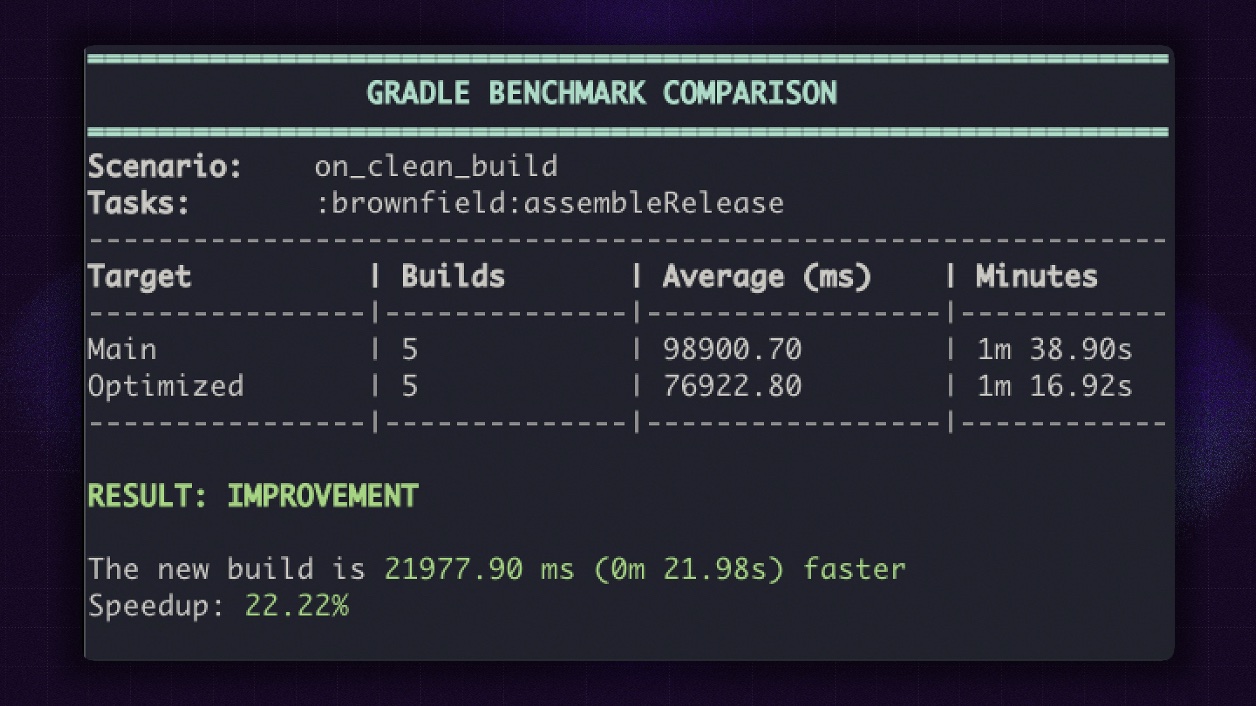
To make the result reproducible, we added a Gradle Profiler setup to the react-native app which applies the brownfield-gradle-plugin .
The benchmark scenario runs:
:brownfield:assembleReleasewith
clean
--no-build-cache
--no-configuration-cacheIt uses two warm-up builds and five measured builds. This is intentionally strict: by disabling build cache and configuration cache, the benchmark focuses on the raw clean-build cost of the plugin changes.
The measured result:
In practical terms, the optimized plugin saves almost 22 seconds on this benchmarked clean release build.
That is a meaningful improvement for local development, CI, and any workflow where brownfield libraries are rebuilt frequently.
Final thoughts
The 22% improvement is the headline, but the deeper win is architectural: the plugin now does less during configuration, gives Gradle more explicit tasks to work with, and separates dependency discovery from artifact processing. The best build performance improvements often come from respecting the build system’s lifecycle.
In this effort, we did exactly that. We replaced eager, tightly coupled variant processing with a task-driven pipeline built around lightweight artifact metadata. We split responsibilities across focused processors. We improved Expo integration. And we added benchmark tooling so future changes can be measured instead of guessed.
The outcome is a Brownfield Gradle Plugin that is not only 22% faster, but also easier to maintain, easier to debug, and better aligned with modern Gradle and Android build patterns.
For teams adopting React Native incrementally inside existing native apps, that means less waiting, more predictable builds, and a smoother path to brownfield integration.
If you’re interested in following the work we do for Brownfield, find out more here and leave a star ⭐



Learn more about Brownfield
Here's everything we published recently on this topic.