Using TurboModule Substitution to Build Safer React Native Plugin Systems

In our previous article, we introduced direct communication between sandbox instances in react-native-sandbox. This time we're tackling a deeper problem: what happens when sandboxed code needs access to shared resources? How do you allow it in a safe way without compromising safety and stability?
The problem: Shared resources in TurboModules
By shared resources we mean anything that lives outside the JavaScript runtime and is accessed through native modules: the file system, persistent storage, hardware like the camera and microphone, location services, and so on.
When you run multiple React Native instances inside one app, each instance gets its own set of native module instances. However, those modules still may access the same underlying shared resources with no awareness of which sandbox is calling them.
This means a sandbox can:
- Read or overwrite the host's data: whether it's files on disk or key-value storage, every instance operates on the same paths and databases by default.
- Interact with hardware: if permission is granted to the app, camera, microphone, and other device APIs are accessible to any instance. Proper hardware access will likely require a separate permission management layer in the future.
Before, we had only one tool for this: the allowedTurboModules property: a whitelist that controls which additional native modules a sandbox can load. Anything not on the list is blocked entirely. And blocking isn't always the answer. A sandboxed micro-app might legitimately need access to the file system or the microphone, just not all the time, and not with the same scope as the host.
What we needed was a way to transparently swap a native module for a sandbox-safe alternative that scopes its behavior to the sandbox that's using it.
The solution: turboModuleSubstitutions
The new turboModuleSubstitutions prop lets the host declare module replacements per sandbox. When sandbox JS code requests a specific native module to load, the sandbox runtime can resolve a different native module instead.
<SandboxReactNativeView
  origin="plugin-a"
  componentName="PluginApp"
  jsBundleSource="plugin"
  allowedTurboModules={['RNFSManager', 'FileAccess', 'RNCAsyncStorage']}
  turboModuleSubstitutions={{
    RNFSManager: 'SandboxedRNFSManager',
    FileAccess: 'SandboxedFileAccess',
  }}
/>
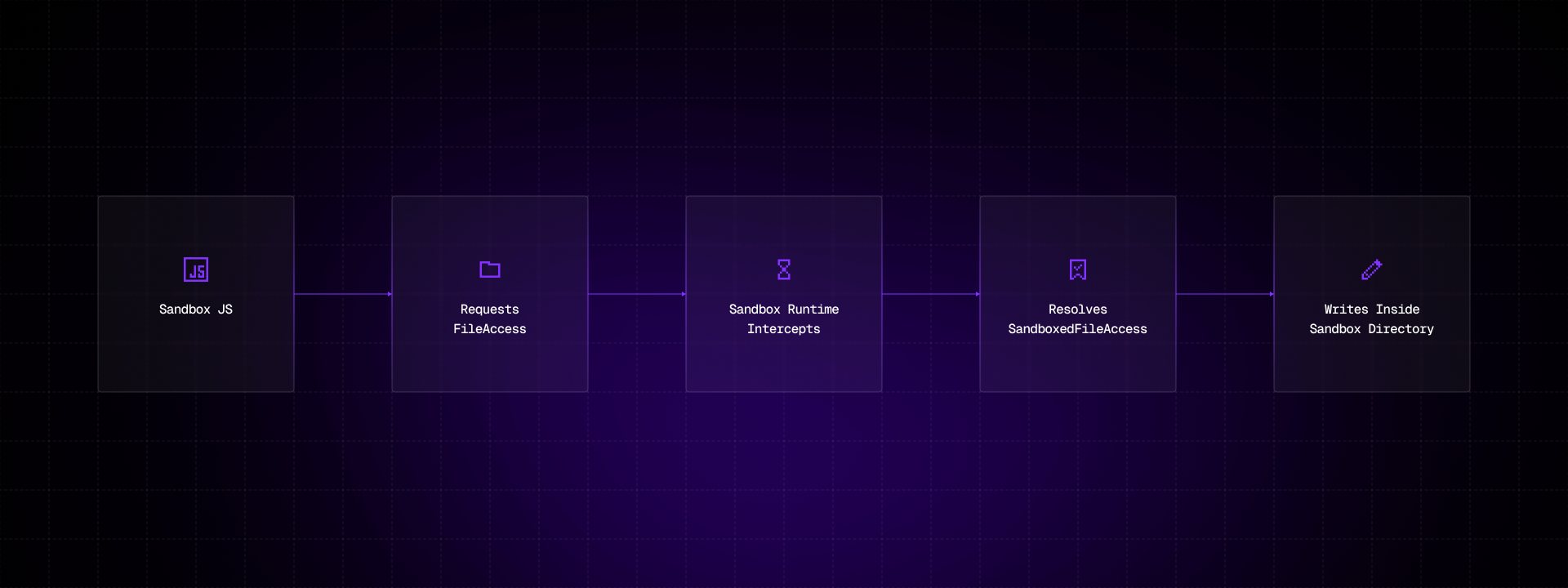
When PluginApp calls FileSystem.writeFile(path, content), the request for FileAccess is intercepted and resolved to SandboxedFileAccess instead. The sandbox code doesn't know the difference. It uses the standard react-native-file-access API as usual.
A few key design decisions:
- Substituted modules are implicitly allowlisted. If you declare a substitution, you don't also need to add the module to
allowedTurboModules. - Runtime reconfiguration. Changing
turboModuleSubstitutionsat runtime triggers a full sandbox re-instantiation, ensuring the new module map takes effect cleanly. - No JS-side changes. The sandbox code imports and uses the original library. The swap happens entirely at the native module resolution layer.
Making modules sandbox-aware
Of course, we still need to write the sandboxed implementation ourselves. Depending on the module, this can be a trivial wrapper or a more involved task. Either way, the replacement module needs to know which sandbox it's serving. That's where the SandboxAwareModule protocol comes in.
When a substituted module is instantiated, the sandbox delegate checks whether it implements the sandbox-aware interface. If it does, the delegate calls configureSandbox with context about the sandbox instance: its origin, the module name that was requested, and the module name that was resolved.
In C++:
struct SandboxContext {
  std::string origin;            // e.g. "plugin-a"
  std::string requestedModuleName; // e.g. "RNCAsyncStorage"
  std::string resolvedModuleName;  // e.g. "SandboxedAsyncStorage"
};

class ISandboxAwareModule {
public:
  virtual void configureSandbox(const SandboxContext& context) = 0;
};
And the equivalent ObjC protocol:
@protocol RCTSandboxAwareModule <NSObject>

- (void)configureSandboxWithOrigin:(NSString *)origin
                     requestedName:(NSString *)requestedName
                      resolvedName:(NSString *)resolvedName;
@end
This is the hook that enables per-origin scoping. A sandboxed react-native-file-access implementation, for example, uses the origin to create an isolated directory structure and jail all file paths:
@interface SandboxedFileAccess : RCTEventEmitter <NativeFileAccessSpec, RCTSandboxAwareModule>
@property (nonatomic, copy) NSString *sandboxRoot;
@end

@implementation SandboxedFileAccess

- (void)configureSandboxWithOrigin:(NSString *)origin
                     requestedName:(NSString *)requestedName
                      resolvedName:(NSString *)resolvedName
{
    NSString *appSupport = NSSearchPathForDirectoriesInDomains(
        NSApplicationSupportDirectory, NSUserDomainMask, YES).firstObject;
    NSString *bundleId = [[NSBundle mainBundle] bundleIdentifier];
    _sandboxRoot = [[[appSupport stringByAppendingPathComponent:bundleId]
        stringByAppendingPathComponent:@"Sandboxes"]
        stringByAppendingPathComponent:origin];

    // Override all directory constants to sandbox-scoped paths
    _documentsDir = [_sandboxRoot stringByAppendingPathComponent:@"Documents"];
    _cachesDir    = [_sandboxRoot stringByAppendingPathComponent:@"Caches"];
    _libraryDir   = [_sandboxRoot stringByAppendingPathComponent:@"Library"];
}
After this call, every readFile, writeFile, and ls operation is confined to the sandbox's own directory tree. Path arguments that resolve outside sandboxRoot are rejected with EPERM. The same pattern applies to other modules like AsyncStorage. Storage is scoped to a per-origin directory so sandboxes can't see each other's data.
Real-world example: file system and storage isolation
The fs-experiment example app demonstrates substitution in practice. It shows a split-screen layout where the host and a sandbox run the same UI with a simple file operations interface that can write and read from react-native-fs, react-native-file-access, and AsyncStorage.
A toggle switches module substitution on and off. When substitution is off, the sandbox has direct access to the same storage and file paths as the host: you can write a value in the host and read it from the sandbox. When substitution is on, each side operates in its own isolated storage directory. The sandbox can no longer see the host's data.
const SANDBOXED_SUBSTITUTIONS = {
  RNFSManager: 'SandboxedRNFSManager',
  FileAccess: 'SandboxedFileAccess',
  RNCAsyncStorage: 'SandboxedAsyncStorage',
};

<SandboxReactNativeView
  origin="sandbox.fs-experiment.demo"
  componentName="SandboxApp"
  jsBundleSource="sandbox"
  allowedTurboModules={['RNFSManager', 'FileAccess', 'RNCAsyncStorage']}
  turboModuleSubstitutions={
    useSubstitution ? SANDBOXED_SUBSTITUTIONS : undefined
  }
/>
The sandbox JS code is identical in both cases. It uses the standard AsyncStorage and FileSystem APIs. The isolation is entirely transparent.
Beyond file system: other scenarios
File system and storage isolation is the most obvious use case, but the substitution mechanism is generic: it works with any TurboModule. Here are a few other scenarios where it could be useful:
- Analytics scoping. Substitute the analytics module so each sandbox reports events tagged with its own origin. A third-party plugin can't pollute the host's analytics stream or see other plugins' event data.
- Networking restrictions. Replace the networking module to restrict allowed domains, inject sandbox-specific auth headers, or enforce rate limits per sandbox.
- Keychain & credentials. Scope secrets per sandbox so a plugin can store and retrieve its own tokens without access to the host's credentials.
- Logging. Route sandbox logs to a separate destination or automatically prefix them with the sandbox origin for easier debugging in multi-instance setups.
Conclusion
TurboModule substitution, available in version 0.6.0, gives sandbox hosts granular control over what native capabilities sandboxed code actually gets. Instead of choosing between "full access" and "no access", you can provide scoped, safe alternatives that let sandboxes use real native functionality without compromising isolation.
Whether you're building a plugin system, a micro-frontend architecture, or a multi-tenant application, this pattern enables real native capability inside sandboxed boundaries.
To get started, check out the fs-experiment example and the complete API documentation.



Learn more about Super Apps
Here's everything we published recently on this topic.