

A retailer planning a mobile commerce and membership platform needs more than a customer app. Store staff need to receive and fulfill app orders, payments need to work with existing systems, and customers must retain their loyalty balances when their data is migrated to the new platform. Once the apps launch, someone must still keep those connections working and continue developing the product.
How could an agentic software factory change the work involved in building and maintaining a product? Using an anonymized proposal, we examine the workflow from specification to release, which tasks agents would perform, what responsibilities would still fall on engineers, and how this division of work would affect the projected costs.
The cost model assumes that one engineer supervising the factory could handle the post-launch workload allocated to five engineers in the reference scenario. Together with the initial build costs, this produces a forecast of approximately 65% lower total costs across development and three years after launch.
The proposal estimates these savings based on the work agents would handle, the engineering supervision they would need, and the cost of operating the factory. We examine those assumptions below so you can assess whether a similar model could fit your product.
What is an agentic software factory?
An agentic software factory is a software delivery workflow configured for a product, in which AI agents implement and verify changes using its specifications, codebase, tools, and automated checks. It puts AI SDLC, the use of AI across the software development life cycle, into practice. Engineers define the intended behavior, make technical decisions, and remain responsible for the result.
For more technical context, our session on React Native Software Factories covers specifications, independent reviews, device verification, stalled runs, and controls over merges.
The product needs a delivery plan and an operating model
Customers manage membership, browse products, place orders, and choose fulfillment options, while store staff receives and processes those orders. Existing customer data must carry over, and the new apps need to work with the retailer’s existing systems for payments, memberships, and store orders.
The solution would include a customer app for iOS and Android and a staff app. Delivering them would involve administrative tooling, integrations, data migration, testing, and preparation for release.
Both apps would use the same backend to manage members, orders, and other product data.
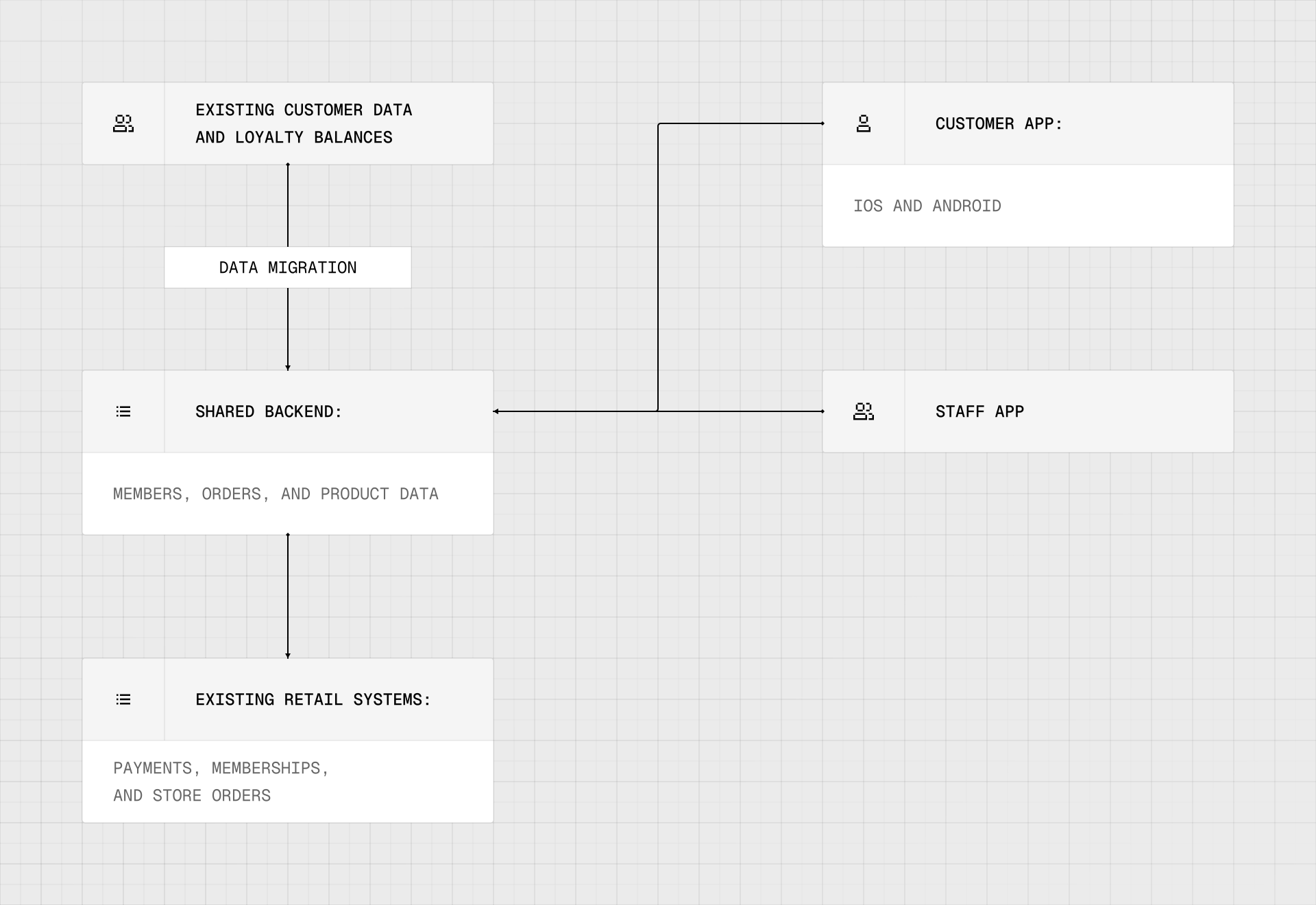
The proposed platform connects customer and staff apps through a shared backend and integrations with existing retail systems.
The delivery plan groups the work into three stages:
| Stage | Work included |
|---|---|
| Scope and design | Agree on the launch scope, refine designs, define acceptance criteria, and identify dependencies and owners. |
| Build and validate | Develop both applications and integrations, test the agreed journeys, rehearse migration, and resolve launch blockers. |
| Launch and handover | Prepare releases, document operations, configure the software factory for handover, and agree on ownership and support responsibilities. |
The project would have a fixed price for an agreed scope of work. Before development begins, the team and the product owners would agree on what the apps must do and how they will check that those requirements have been met.
How the factory handles a software change
Engineers approve the requirements, agents write and check the code, and automated checks block changes that are not ready for release. After release, an agent checks that the update works as expected. The workflow below illustrates delivery for a React Native app. Changes to native iOS or Android code require a separately agreed process.
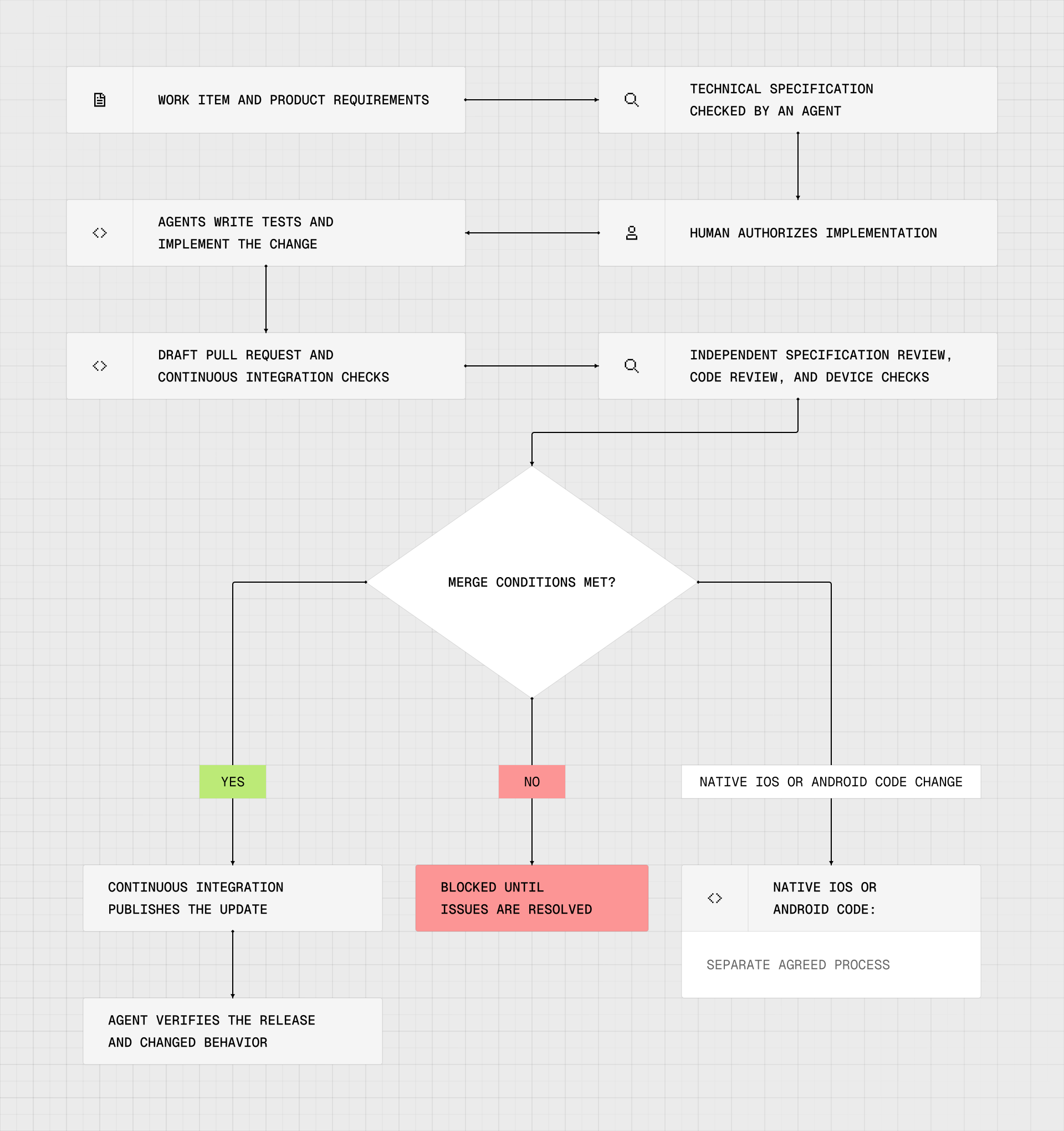
The proposed workflow combines agent implementation and verification with human authorization and enforced merge conditions.
1. Turn a request into a specification
A need or idea enters the workflow as a work item, such as a GitHub issue or a ticket in Jira or Linear. Product requirements are developed into a technical specification, which an agent checks. A person authorizes the implementation run.
This makes the intended behavior available before implementation begins. Review can then compare the change with the requirements it was supposed to satisfy. The specification needs acceptance criteria that can pass or fail, relevant interfaces and data contracts, and a way to verify the behavior.
2. Implement against the agreed requirements
Agents would start by writing tests and implementing the change in a separate copy of the code, keeping their work separate from other changes during development and testing. They would open a draft pull request so continuous integration checks could run from the first push.
3. Verify through independent checks
The verification stage includes separate specification and code reviews, alongside an application run using agent-device, a tool that lets an agent operate and inspect the app.
These checks address different questions: whether the implementation follows the specification, whether the code has problems, and whether the application behaves as expected when operated.
A verifier attempts to reproduce each blocking issue identified during review before it is treated as a confirmed defect.
4. Enforce the merge conditions
A merge gate is an automated check that prevents changes from being combined with the main codebase unless specified conditions are met.
One script would control whether changes can be merged into the main codebase. It refuses draft changes, failing continuous integration checks, missing reviews, unresolved specification gaps, and changes to native iOS or Android code.
Changes to native iOS or Android code fall outside this automatic merge path and require a separately agreed process. The scope of agent autonomy should follow the risk of the change, with human decisions placed at the appropriate points in the workflow.
5. Publish and check the result
After the change passes the required controls, continuous integration publishes the production update. An agent then checks that the update was released successfully and that the changed feature works according to the agreed requirements.
Bringing production errors into the factory
After launch, production monitoring could feed new work into the same delivery process. An integration with an error-monitoring service such as Sentry could automatically create a work item when selected errors occur, attaching diagnostic context for an agent to investigate. Sentry’s own Seer agent already supports root cause analysis and automatic pull request creation for selected issues, demonstrating that parts of this workflow are available today.
For the retailer’s apps, a possible example would be a crash when a customer opens their order history. An agent could investigate the report and propose a correction against the expected behavior. Once an engineer authorizes implementation, the factory could attempt to reproduce the failure, add a regression test, and implement the fix through the verification and release process described above. Changes to native iOS or Android code would continue through the separately agreed process.
After release, verification would cover the affected customer journey, with monitoring used to check whether the error recurs. Engineers would handle cases where the cause remains unclear or the proposed correction requires a product decision. The engineering time spent investigating, reviewing, and correcting these cases would help determine how much maintenance work the factory could take on.
Where software maintenance automation changes the business case
After launch, the team would continue using the factory to maintain and develop the apps.
Recurring engineering work can require the same sequence repeatedly: understand a request, locate the relevant code, make a change, run checks, respond to review, and verify the release. Software maintenance automation can reduce the manual execution involved in that sequence when the work has clear requirements and reliable verification.
Engineers still need to decide what the product should do, assess technical tradeoffs, handle exceptions, and maintain the workflow itself. The financial question is how much engineering capacity the selected work continues to require once those responsibilities are accounted for.
The staffing model compares the engineering capacity needed for that ongoing work:
| Reference scenario | Factory scenario |
|---|---|
| Five engineers allocated to the modeled work after launch. | One engineer supervising the factory for that workload. |
Whether one supervising engineer would be enough depends on the amount and difficulty of the maintenance work. If agents frequently need help or their changes require extensive correction, supervision could take more time than one person has available. The staffing estimate therefore needs to account for how often engineers must intervene and how long those interventions take.
Reading the projected 65% cost reduction
The cost model includes the initial build and three years of work after launch. Under the model’s assumptions, delivery and maintenance with the factory would cost approximately 35% of the reference scenario’s total.
The reference scenario is set to 100; the factory scenario is shown relative to that total.
| Modeled total cost: build plus three years after launch | Index |
|---|---|
| Reference delivery and maintenance scenario | 100 |
| Delivery and software factory scenario | Approximately 35 |

Under the proposal’s assumptions, the factory scenario’s projected total cost is approximately 35% of the reference scenario.
That corresponds to a projected reduction of approximately 65%.
The cost difference grows over the three years after launch as the factory scenario’s lower recurring engineering costs accumulate.
The budget also extends beyond the supervising engineer. To assess the potential savings for your product, consider the full cost of delivery and ongoing operation, including:
- Initial development, integrations, and factory setup.
- Engineering supervision and work that agents cannot complete.
- AI models, tools, infrastructure, and test environments.
- Updates to the factory’s integrations and automated checks.
- Reviewing, testing, and correcting changes, including failed attempts and retries.
The factory itself also needs maintenance. Engineers need to update the information agents use and fix problems in their tools and checks. For example, in our AI Figma-to-code workflow, agents need current instructions for using existing interface components. Maintaining those instructions takes engineering time, which should be included in operating costs.
Automation changes how these activities are performed, but they still require time and resources. The relevant comparison is the total cost of delivering and maintaining your product, including the work your team retains after launch.
Matt Hargett’s article on measuring the Outer Business Loop in AI SDLC offers a useful way to assess that trade-off: look at the business outcomes and the full cost of delivering them, including unsuccessful attempts and retries. For your product, that means asking whether the factory can deliver the required changes at the expected quality for a lower total cost.
Handover includes the process used to change the product
At handover, the product owner would receive the apps, the configured software factory, and an operating guide, with system ownership and support responsibilities agreed.
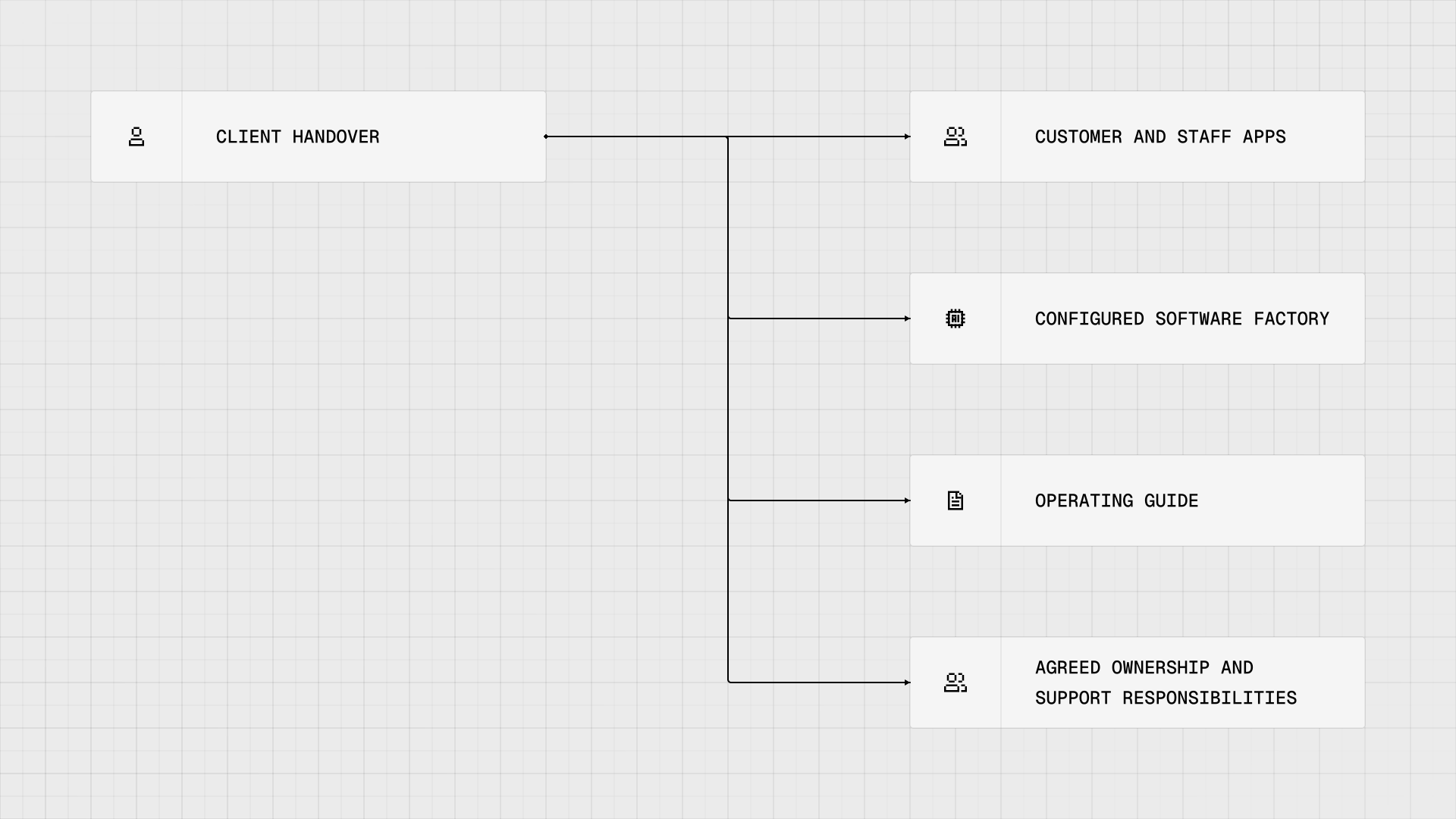
Handover includes the applications, the configured delivery workflow, and guidance and responsibilities for operating them.
To use and maintain the factory, you would need to know:
- How to submit new work.
- Who approves specifications and handles exceptions.
- Which checks a change must pass.
- Who maintains the agents, integrations, and test infrastructure.
- Who makes release decisions and provides support.
The responsibilities your team retains would affect the engineering capacity needed after handover and the ongoing cost of running the apps.
Could a software factory fit your product?
This example shows how a software factory could support both the initial build and ongoing development: agents implement and verify changes, while engineers approve requirements, make technical decisions, and handle exceptions. Handover includes the configured factory and guidance for continuing that work after launch.
The projected 65% cost reduction depends on sustaining that division of work with less ongoing engineering capacity. For your product, the savings would depend on the workload agents can handle, the supervision they need, and the cost of maintaining the factory.
You can test those conditions with one recurring workflow. Measuring completed work, quality, engineering intervention, and operating costs would give you evidence to assess the forecast before expanding automation.
Explore our AI SDLC Advisory approach to see how we assess a workflow, test it in delivery, and measure whether to scale it.
Planning a product and its ongoing engineering needs? Talk to us about the delivery workflow, verification requirements, and handover model that could fit your team.


